> For the complete documentation index, see [llms.txt](https://prosbcdocs.telcobridges.com/llms.txt). Markdown versions of documentation pages are available by appending `.md` to page URLs; this page is available as [Markdown](https://prosbcdocs.telcobridges.com/telecom-references/transmission-and-lines/caf-working-with-cmc-call-legs.md).
# CAF: Working With Cmc Call Legs
### Call Leg Definition
The main mechanism through which the customer application controls the [Toolpack](https://telcobridges.com/products/development-platforms-tdev/) system is via the management of call legs. The application creates a call leg (or more than one for conferencing and bridging), then controls it through a simple, protocol-agnostic API. When a call is terminated, the call leg can be destroyed.
A call leg is represented by an instance of the [CTBCMCLeg](https://docs.telcobridges.com/mediawiki/autodoc/class_c_t_b_c_m_c_leg.html) class. It represents a full-duplex media resource and/or its associated signaling entity. Typical examples of call legs with signaling would be an [SS7](https://telcobridges.com/media-gateways/solutions/signaling/migrating-ss7-sigtran/) [ISUP](https://github.com/telcobridges-main/tmedia-wiki/tree/main/reference/protocols/isup/README.md) call with its associated [CIC](https://github.com/telcobridges-main/tmedia-wiki/tree/main/reference/signalling/circuit-identification-code/README.md) (mapped to a [TDM](https://github.com/telcobridges-main/tmedia-wiki/tree/main/reference/transmission/tdm/README.md) interface such as a T1 [timeslot](https://github.com/telcobridges-main/tmedia-wiki/tree/main/reference/transmission/timeslot/README.md)) or a [SIP](https://telcobridges.com/learning/sip-trunking/what-is-sip/) call with its associated [VoIP](https://github.com/telcobridges-main/tmedia-wiki/tree/main/reference/sip-voip/voip/README.md) [codec](https://github.com/telcobridges-main/tmedia-wiki/tree/main/reference/voice-media/voice-codecs/README.md) resource (attached to an IP/UDP endpoint). A media-only call leg would represent a standalone TDM endpoint (such as a T1 timeslot) or a VOIP endpoint (VOIP codec resource attached to an IP/UDP endpoint). The section titled [Leg Creation](https://github.com/telcobridges-main/tmedia-wiki/tree/main/reference/api/caf-working-with-call-legs/README.md#leg-creation) describes how different types of call legs can be created.
The CTBCMCLeg class allows a programmer to easily act upon the call leg to influence the signaling portion (e.g. accept, answer, terminate, etc) and to use the media portion as well (e.g play prompts, record voice, play or collect digits and tones).
Other member functions are available to retrieve (and change in some cases) the call leg attributes including the media profile (e.g. parameters to the media resource) or signaling information (e.g. protocol type, called and calling party numbers, etc). Joining/unjoining (connection/disconnection) of call legs is also a typical action handled by this class for ’gateway-type’ applications. It is important to note that this class is protocol-agnostic and can handle any type of supported call legs (e.g. SIP/VOIP, [ISDN](https://github.com/telcobridges-main/tmedia-wiki/tree/main/reference/protocols/isdn/README.md), SS7, Media only, etc).
**Caveats**
* Do not confuse a *call leg* with a *call*. A *call leg* represents one full-duplex link to a party while a *call* represents the agglomeration of multiple (two or more) call legs. For example, a *bridge* is a form of *call* that uses two *call legs*.
* Do not confuse the base class CTBCMCLeg with the class [CTBCAFCallLeg](https://docs.telcobridges.com/mediawiki/autodoc/class_t_b_c_a_f_1_1_c_t_b_c_a_f_call_leg.html). The latter is an implementation class specialized to be used by the [ITBCAFCallFlow](https://docs.telcobridges.com/mediawiki/autodoc/class_t_b_c_a_f_1_1_i_t_b_c_a_f_call_flow.html) interface when dealing with multiple legs. It is designed to represent a leg within a call.
**Recommendation**
We recommend that developers use the [CTBCAFCallFlow](https://docs.telcobridges.com/mediawiki/autodoc/class_t_b_c_a_f_1_1_c_t_b_c_a_f_call_flow.html) model for managing call legs. This higher-level framework offers various advantages over managing call legs individually through CTBCMCLeg class.
An example of CTBCAFCallFlow usage is [CTBCAFBridge](https://docs.telcobridges.com/mediawiki/autodoc/class_t_b_c_a_f_1_1_c_t_b_c_a_f_bridge.html) class. This class deals with a call bridge that includes two main call legs communicating with each other, and can be decorated with other behaviors that may provide play, record, lawful interception or other functionalities around the two main "bridged" call legs.
Documentation about CTBCAFBridge can be found here: [Working with CAF Call Legs and behaviors](https://github.com/telcobridges-main/tmedia-wiki/tree/main/reference/api/caf-working-with-caf-call-legs/README.md)
### Audio Mixer Definition
In addition to the joining of call legs to have audio flow between them, another option is to join call legs to audio mixers. Audio mixers can be used, among other things, to:
* Build conferences
* Play background music to a conversation
* Record both sides of the conversation into a single recorded file. General information about TMedia Mixers: [Audio Mixers](https://github.com/telcobridges-main/tmedia-wiki/tree/main/reference/voice-media/audio-mixers/README.md)
Audio mixers are represented through class CTBCMCMixer. Information on that class can be found here: [Working with CMC Mixers](https://github.com/telcobridges-main/tmedia-wiki/tree/main/reference/sip-voip/caf-working-with-cmc-mixers/README.md)
### Command Flow for Leg Actions
All actions requested on a leg are executed asynchronously. For each action **DoSomething()** on a leg, a corresponding **OnDoSomethingResponse()** event will be received on the leg once Toolpack starts processing the command. If the **OnXXXResponse()** function does not handle the response (the default implementation is empty) and the result of the action was a failure, the default error handling function **OnLegError()** will be called. Most of the actions executed on a leg can take a variable amount of time to complete. In this case, an extra event will be received on the leg once the action is complete (**OnXXXResponse()** is always called when Toolpack **starts** executing the action), for example, to play a digit sequence, one would call **PlayDigit()**. It would then almost immediately receive the **OnPlayDigitResponse()** event indicating that Toolpack has received the command. At the same time this event is called, Toolpack will start playing the digits on the leg. Once the digits play is completed, the user will receive an **OnDigitPlayingDone()** event.
### Leg Creation
Creating a leg is always done through the definition of a *call leg attribute*. The values entered in the *call leg attribute* will define the type of call leg created and its parameters. The following sections describe several scenarios in which you build a *call leg*. Instruction will be given on how to fill the leg attributes and how to use them to create the *call leg*.
#### Preparing Leg Attributes
**Normal Call Leg Attributes**
For calls including both the signaling and the media path, there are very few parameters that one must enter. The required parameters are:
* the called number,
* the calling number,
* the [Network Access Point](https://github.com/telcobridges-main/tmedia-wiki/tree/main/reference/protocols/nap/README.md).
Toolpack will automatically select an available channel in the specified NAP to make the call leg. Only NAPs of type *SS7*, *ISDN* or *SIP* can be specified for the call leg attribute (see [NAP Types](https://github.com/telcobridges-main/tmedia-wiki/tree/main/reference/protocols/nap/README.md#nap-types)).
The following code snippet shows how to build the attributes. PTRCTBCMC\_CALL\_LEG\_ATTRIBUTE ptrOutgoingLegAttribute;
```
ptrOutgoingLegAttribute = tbnew CTBCMC_CALL_LEG_ATTRIBUTE();
ptrOutgoingLegAttribute->GetCalledNumber() = "123-4567";
ptrOutgoingLegAttribute->GetCallingNumber() = "987-6543";
ptrOutgoingLegAttribute->GetNetworkAccessPoint() = "NAP_SS7_MONTREAL";
```
**Media-only Leg Attributes**
For media-only legs, no signaling information is needed but the user can specify which media channel to use and which media profile to use. The only required parameters are the [Network Access Point](https://github.com/telcobridges-main/tmedia-wiki/tree/main/reference/protocols/nap/README.md) and the leg type. Only NAPs of type *MEDIA TDM* or *MEDIA VOIP* can be specified for media-only leg attribute (see [NAP Types](https://github.com/telcobridges-main/tmedia-wiki/tree/main/reference/protocols/nap/README.md#nap-types)).
```
PTBCMC_MEDIA_DESCRIPTION pMediaDesc;
PTRCTBCMC_MEDIA_ONLY_LEG_ATTRIBUTE ptrLegAttribute;
ptrLegAttribute = tbnew CTBCMC_MEDIA_ONLY_LEG_ATTRIBUTE();
pMediaDesc = ptrLegAttribute->GetProfile().GetMediaDescription();
ptrLegAttribute->GetNetworkAccessPoint() = "NAP_MEDIA_1";
pMediaDesc->Type = TBCMC_MEDIA_TYPE_AUDIO;
pMediaDesc->Transport = TBCMC_MEDIA_TRANSPORT_TDM or TBCMC_MEDIA_TRANSPORT_IP;
```
When only the NAP and type are specified, Toolpack will automatically select an available channel in the specified NAP to allocate the media path. For *MEDIA TDM* NAPs, a trunk/timeslot from the specified NAP will be chosen by Toolpack. For *MEDIA VOIP* NAPs, an IP interface and port from the specified NAP will be chosen.
If the user wants to specify which media channel to use, he can do so by adding extra information in the leg attribute. For TDM legs, a trunk name and a timeslot number can be specified.
```
PTBCMC_MEDIA_DESCRIPTION pMediaDesc;
pMediaDesc->Settings.TdmAudio.Type = TBCMC_MEDIA_SETTINGS_TYPE_TDM_AUDIO;
pMediaDesc->Settings.TdmAudio.un8Timeslot = 5;
Strncpy
(
pMediaDesc->Settings.TdmAudio.szTrunkName,
"TRUNK_TORONTO_1",
sizeof(pMediaDesc->Settings.TdmAudio.szTrunkName)
);
```
For VOIP legs, the user can control the media by providing local SDP and peer SDP. Setting the local SDP defines the codec and IP/port used to for the received media stream. Most of the time, the IP address and port should be left empty to let Toolpack choose an available port. Setting the peer SDP defines the codec and IP/port used for the transmitted media stream. Note that Toolpack only allows for the same codec to be used in RX and TX. If both local SDP and peer SDP are specified, codecs that are not in **both** SDP will be filtered out.
For details on how to fill the TBX\_SDP\_INFO structure needed for SetLocalSDP and SetPeerSDP, see [Filling an SDP Structures](https://github.com/telcobridges-main/tmedia-wiki/tree/main/reference/sip-voip/caf-filling-sdp-structures/README.md).
```
TBX_RESULT Result;
TBX_SDP_INFO SdpInfo;
PTBCMC_MEDIA_DESCRIPTION pMediaDesc;
pMediaDesc = ptrLegAttribute->GetProfile().GetMediaDescription();
pMediaDesc->Settings.PacketAudio.Type = TBCMC_MEDIA_SETTINGS_TYPE_PACKET_AUDIO;
// Set Local SDP
Result = BuildSdpInfo("", 0, SdpInfo); // No IP specified, Toolpack will choose one
TBCAF_EXIT_ON_ERROR( Result, "BuildSdpInfo failed." );
ptrLegAttribute->GetProfile().SetLocalSDP(SdpInfo);
// Set Peer SDP
Result = BuildSdpInfo("10.0.0.15", 5000, SdpInfo); // Using peer IP address and port
TBCAF_EXIT_ON_ERROR( Result, "BuildSdpInfo failed." );
ptrLegAttribute->GetProfile().SetPeerSDP(SdpInfo);
```
#### Choosing a unique LegId
Each leg must be assigned a unique LegId.
* The LegId of incoming call legs is chosen by the Toolpack system and provided to the application upon <[https://docs.telcobridges.com/mediawiki/autodoc/class\\\_c\\\_t\\\_b\\\_c\\\_m\\\_c\\\_lib\\\_user.html#CTBCMCLibUser::OnCallLegPresent\*\*OnCallLegPresent()\*\*>](https://docs.telcobridges.com/mediawiki/autodoc/class\\_c\\_t\\_b\\_c\\_m\\_c\\_lib\\_user.html#CTBCMCLibUser::OnCallLegPresent**OnCallLegPresent\(\)**>). This LegId must be provided when creating the new CTBCMCLeg object.
* For outgoing call legs (or media only legs), the LegId 0 should be passed to the constructor of CTBCMCLeg, which will assign an appropriate LegId to that call leg.
* For re-synchronized call legs, the LegId is passed by Toolpack upon OnCallLegSync(), and must be used for re-creating the CTBCMCLeg object.
#### Creating the Leg
Once the leg attributes have been filled, creating the leg in Toolpack is only a matter of creating a CTBCMCLeg object and calling [**CreateCall()**](https://docs.telcobridges.com/mediawiki/autodoc/class_c_t_b_c_m_c_leg.html#CTBCMCLeg::CreateCall) on it. No action is taken when an instance of a CTBCMCLeg is created. Call resources are only allocated in the Toolpack system when **CreateCall()** is called on the object.
```
pCallLeg = new CTBCMCLeg( in_un32LegId /* or 0 for outgoing or media-only legs */, ptrLegAttribute, this, 0, &mLegMutex );
pCallLeg->CreateCall();
```
For legs with signaling, the **CreateCall()** will trigger the sending of the call setup message (SIP Invite, SS7 IAM, etc.). In that case, the media resources are not allocated immediately. They will be allocated only when the signaling part of the call setup is complete. If the application requests a media action (PlayFile, StartDigitCollection, etc.) on the leg, this will immediately trigger the allocation of the media resources even if the call is not yet answered (used for early media for example).
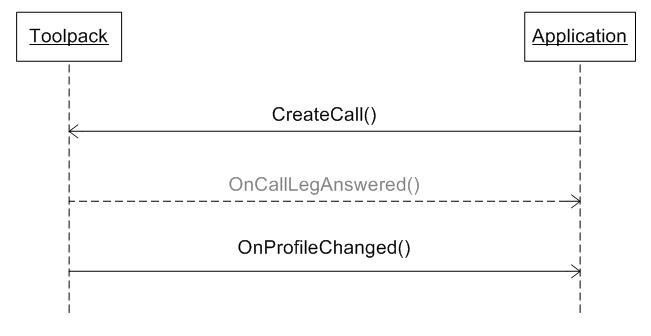
For media-only legs, the media ressources will always be allocated as soon as **CreateCall()** is called.
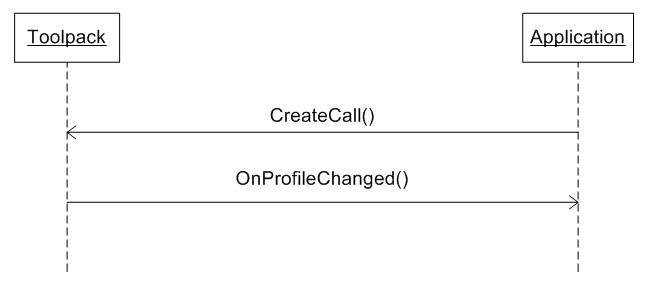
Once a call is fully active (call answered and media allocated), event [**OnProfileChanged()**](https://docs.telcobridges.com/mediawiki/autodoc/class_c_t_b_c_m_c_leg.html#CTBCMCLeg::OnProfileChanged) will be sent on the leg. In the cases where the user had not specified the IP/port to use, once this event is received, the media profile has been updated with the values chosen by Toolpack and the updated values can be retrieved using the functions **GetLocalSDP()** and **GetPeerSDP()** of the profile. Note that the **OnProfileChanged()** event is also sent after the media profile has been modified with the [**ChangeProfile()**](https://docs.telcobridges.com/mediawiki/autodoc/class_c_t_b_c_m_c_leg.html#CTBCMCLeg::ChangeProfile) function (see \[\[#Modifying Media Profile|Modifying Media Profile]]) and when a connected peer has requested it (through a SIP re-INVITE for example).
See [Leg creation example](https://github.com/telcobridges-main/tmedia-wiki/tree/main/reference/misc/caf-leg-creation-samples/README.md) for sample code of leg creation in different scenarios.
#### Caveats
* The call leg attribute is an object containing the call leg information (called/calling numbers, media profile, etc) that needs to be allocated by the caller and used when creating the leg object. It will be freed automatically when the leg is destroyed (it uses a shared-pointer so it is in fact destroyed when there are no more references to it).
### Interaction with Legs
#### Playing and Collecting Digits
You can play digits by calling [**PlayDigit()**](https://docs.telcobridges.com/mediawiki/autodoc/class_c_t_b_c_m_c_leg.html#CTBCMCLeg::PlayDigit) on a leg. Toolpack will receive the request and play the digits. Once digits are played, the leg will receive [**OnDigitPlayingDone()**](https://docs.telcobridges.com/mediawiki/autodoc/class_c_t_b_c_m_c_leg.html#CTBCMCLeg::OnDigitPlayingDone) event.
You can also configure a leg to collect digits played. To start the digit collection, you have to call [**StartDigitCollection()**](https://docs.telcobridges.com/mediawiki/autodoc/class_c_t_b_c_m_c_leg.html#CTBCMCLeg::StartDigitCollection) on the leg. To stop the digit collection, you have to call [**StopDigitCollection()**](https://docs.telcobridges.com/mediawiki/autodoc/class_c_t_b_c_m_c_leg.html#CTBCMCLeg::StopDigitCollection). A leg will receive [**OnDigitCollected()**](https://docs.telcobridges.com/mediawiki/autodoc/class_c_t_b_c_m_c_leg.html#CTBCMCLeg::OnDigitCollected) event when there will be a match between the asked string and the digits collected. The syntax used to described the digit mask is based on the [RFC3435](http://www.ietf.org/rfc/rfc3435.txt) in section 2.1.5 "Digit Maps".
Here are examples of how to play and collect digit.
**Play Digit**
\`\`
```
ptrOutgoingLeg = GetOutgoingActiveLeg();
if( ptrOutgoingLeg != NULL )
{
/* this will play the sequence of digit 5551234 */
ptrOutgoingLeg->PlayDigit( "5551234" );
}
```
**Collect Digit**
\`\`
```
ptrIncomingLeg = GetIncomingActiveLeg();
if( ptrIncomingLeg != NULL )
{
/*
this will collect digits 5, any sequences of 7 digits beginning by 3 or any sequences of 7 digits
beginning by 4,5,6 or 7 followed by 5 and 5.
*/
ptrIncomingLeg->StartDigitCollection( "5|3xxxxxx|[4-7]55xxxx" );
}
```
#### Playing and Collecting Tones
Tones are defined as events, this is why to play and collect tones, you have to use general event functions. You can add tones you want to play by using [**AddToneString()**](https://docs.telcobridges.com/mediawiki/autodoc/class_c_t_b_c_m_c___e_v_e_n_t___a_t_t_r_i_b_u_t_e.html#CTBCMC_EVENT_ATTRIBUTE::AddToneString) available in [CTBCMC\_EVENT\_ATTRIBUTE](https://docs.telcobridges.com/mediawiki/autodoc/class_c_t_b_c_m_c___e_v_e_n_t___a_t_t_r_i_b_u_t_e.html) class. You can then play events by calling [**PlayEvent()**](https://docs.telcobridges.com/mediawiki/autodoc/class_c_t_b_c_m_c_leg.html#CTBCMCLeg::PlayEvent) on a leg. Toolpack will receive the request and play the events. Once events are played, the leg will receive [**OnEventPlayingDone()**](https://docs.telcobridges.com/mediawiki/autodoc/class_c_t_b_c_m_c_leg.html#CTBCMCLeg::OnEventPlayingDone) event. Note that you can cancel an event to be played by calling [**CancelEvent()**](https://docs.telcobridges.com/mediawiki/autodoc/class_c_t_b_c_m_c_leg.html#CTBCMCLeg::CancelEvent) on the leg after a **PlayEvent()** has been called.
Two kinds of string can be passed to **AddToneString()** to play a tone.
**Play Tone with Signal Id String**
The first type is to play well-known tones such as dtmf and fax tone. The syntax is really simple and is based on H248 package and signal ids. The first component of the string is the package id and the second is the signal id, both formated in a string. So, to play dtmf 0, you have to format the following string: "dg/d0", where "dg" is for package "dtmf generation" and "d0" is for "dtmf 0". A comprehensive list of all the available well known tones is available in the [Tone definitions article](https://github.com/telcobridges-main/tmedia-wiki/tree/main/reference/voice-media/tone-definitions/README.md#available-tones).
```
/* this will play dtmf 7 */

CTBCMC_EVENT_ATTRIBUTE			Event;
Event.AddToneString( "dg/d7" );
ptrOutgoingLeg = GetOutgoingActiveLeg();
if( ptrOutgoingLeg != NULL )
{
	ptrOutgoingLeg->PlayEvent( Event );
}
```
**Play Tone with Custom Tone String**
The second type of string is to play a custom tone. The syntax is much more complicated than the first one, but it follows a well described syntax which can be found in [**H248.6 Dynamic Tone Definition Package**](http://www.itu.int/rec/dologin_pub.asp?lang=e\&id=T-REC-H.248.6-200011-I!!PDF-E\&type=items/.pdf). This kind of string allows you to specify frequencies, duration, amplitude and repeating count of the tone. You can also specify well-known tones and change their default duration, amplitude and repeating count. It is possible to describe a sequence of tones or frequencies that are played in one segment. Here are some examples of the syntax:
**Frequencies 400Hz and 600Hz mixed together for 200ms, amplitude at -10dB and repeating 3 times (playing 4 times):**
* (((#400)+(#600)),200,-10)\*3
>
**Dtmf 5 repeated infinitly:**
* ((0x0005,0x0015))\*0
>
**Multifrequency tone 8:**
* ((mfg,mf8))
>
**Frequency 440Hz played for 300ms at -10dB followed by frequency 600Hz played for 200ms at -5dB and then followed by dtmf 2, all this repeated infinitly:**
* ((#440,300,-10),(#600,200,-5),(0x0005,0x0012))\*0
>
```
/* this will play frequencies 1000Hz and 2100Hz mixed together */

CTBCMC_EVENT_ATTRIBUTE			Event;
Event.AddToneString( "(((#1000)+(#2100)),100,-10)" );
ptrOutgoingLeg = GetOutgoingActiveLeg();
if( ptrOutgoingLeg != NULL )
{
	ptrOutgoingLeg->PlayEvent( Event );
}
```
**Collect Tone**
You can also configure a leg to collect events played. To start the event collection, you have to call [**StartEventCollection()**](https://docs.telcobridges.com/mediawiki/autodoc/class_c_t_b_c_m_c_leg.html#CTBCMCLeg::StartEventCollection) on the leg. Note that you will have to specify which events you want to collect before starting the event collection by calling **AddToneString()** on a CTBCMC\_EVENT\_ATTRIBUTE object. To stop the event collection, you have to call [**StopEventCollection()**](https://docs.telcobridges.com/mediawiki/autodoc/class_c_t_b_c_m_c_leg.html#CTBCMCLeg::StopEventCollection). A leg will receive [**OnEventCollected()**](https://docs.telcobridges.com/mediawiki/autodoc/class_c_t_b_c_m_c_leg.html#CTBCMCLeg::OnEventCollected) event on each event received that correspond to a tone string specified when calling **StartEventCollection()**.
Only one type of string is accepted to specify which events to collect. The string is the same as the first type to play event. Signal ids that are also event id are accepted. This means that you can ask to collect "dg/d0" (dtmf generation/dtmf 0) and the detection will be done anyway. You can also detect all events from a package by putting a \* as event id, so "dd/\*" will detect all dtmf tones.
```
/* this will collect all dtmf tones */

CTBCMC_EVENT_ATTRIBUTE			Event;
Event.AddToneString( "dd/*" );
ptrOutgoingLeg = GetOutgoingActiveLeg();
if( ptrOutgoingLeg != NULL )
{
	ptrOutgoingLeg->StartEventCollection( Event );
}
```
The most commonly used packages are 5 and 6 [**(H248.1 Annex E)**](http://www.itu.int/rec/dologin_pub.asp?lang=e\&id=T-REC-H.248.1-200509-I!!PDF-E\&type=items/.pdf): dtmf generation and dtmf detection.
As H248 does not define events and signals for fax tone, we added a special package to do so. Package *telcofax* (0x8001) contains few events (detected tones) and few signals (generated tones).
The following signals can be generated:
* *telcofax/cng* (id 0x0080 in telcofax package)
* *telcofax/g164* (id 0x0081 in telcofax package)
The following events can be detected:
* *telcofax/cng* (id 0x0080 in telcofax package)
* *telcofax/g164* (id 0x0081 in telcofax package)
* *telcofax/g165* (id 0x0082 in telcofax package)
* *telcofax/ansam* (id 0x0083 in telcofax package)
* *telcofax/phase\_rev\_ansam* (id 0x0084 in telcofax package)
* *telcofax/v21\_flags* (id 0x0085 in telcofax package)
* *telcofax/bell\_ans* (id 0x008F in telcofax package)
#### Collecting digits and tones while call legs are joined
By default, when two call legs are joined together through function CTBCMCCallLeg::Join(), tone collection is automatically disabled. One of the arguments of the Join() function ("in\_fDisableToneWhileJoined") will allow you to control if the automatic tone collection feature is used or not on a call.
Why is Toolpack disabling tone collection on joined legs by default? That's because tone collection introduces a 40ms delay in the audio connection (required to provide tone suppression), and most of the time it is not required to collect digits while two call legs are joined, so it would be useless to leave 40ms delay while tone collection is not required.
#### Playing and Recording Audio Files
You can play an audio stream on a leg by calling [**PlayStream()**](https://docs.telcobridges.com/mediawiki/autodoc/class_c_t_b_c_m_c_leg.html#CTBCMCLeg::PlayStream) on it. To specify which audio stream you want to play, you have to specify it by calling [**AddPlayFilePath()**](https://docs.telcobridges.com/mediawiki/autodoc/class_c_t_b_c_m_c___p_l_a_y___a_t_t_r_i_b_u_t_e.html#CTBCMC_PLAY_ATTRIBUTE::AddPlayFilePath) available in [CTBCMC\_PLAY\_ATTRIBUTE](https://docs.telcobridges.com/mediawiki/autodoc/class_c_t_b_c_m_c___p_l_a_y___a_t_t_r_i_b_u_t_e.html) class. Toolpack will receive the request and play the stream. Once it starts playing, the leg will receive [**OnStreamPlayingStarted()**](https://docs.telcobridges.com/mediawiki/autodoc/class_c_t_b_c_m_c_leg.html#CTBCMCLeg::OnStreamPlayingStarted) event. Once it is played, the leg will receive [**OnStreamPlayingDone()**](https://docs.telcobridges.com/mediawiki/autodoc/class_c_t_b_c_m_c_leg.html#CTBCMCLeg::OnStreamPlayingDone) event. It is possible to play multiple files simultaneously to the same call leg. Audio from all files will be mixed.
You can also configure a leg to record an audio stream. First you must specify file paths to record by calling [**AddRecFilePath()**](https://docs.telcobridges.com/mediawiki/autodoc/class_c_t_b_c_m_c___r_e_c_o_r_d___a_t_t_r_i_b_u_t_e.html#CTBCMC_RECORD_ATTRIBUTE::AddRecFilePath) available in [CTBCMC\_RECORD\_ATTRIBUTE](https://docs.telcobridges.com/mediawiki/autodoc/class_c_t_b_c_m_c___r_e_c_o_r_d___a_t_t_r_i_b_u_t_e.html) class. The you can call [**RecordStream()**](https://docs.telcobridges.com/mediawiki/autodoc/class_c_t_b_c_m_c_leg.html#CTBCMCLeg::RecordStream) on a leg. Once the stream is recorded, the leg will receive [**OnStreamRecordingDone()**](https://docs.telcobridges.com/mediawiki/autodoc/class_c_t_b_c_m_c_leg.html#CTBCMCLeg::OnStreamRecordingDone) event.
You can pause an active playing or recording stream by calling [**PauseStream()**](https://docs.telcobridges.com/mediawiki/autodoc/class_c_t_b_c_m_c_leg.html#CTBCMCLeg::PauseStream) and you can resume it by calling [**ResumeStream()**](https://docs.telcobridges.com/mediawiki/autodoc/class_c_t_b_c_m_c_leg.html#CTBCMCLeg::ResumeStream). If you want to stop an active playing or recording stream, you have to call [**StopStream()**](https://docs.telcobridges.com/mediawiki/autodoc/class_c_t_b_c_m_c_leg.html#CTBCMCLeg::StopStream) on the leg.
For more documentation about how to play files, please refer to the following page:
[How to play audio files with Toolpack](https://github.com/telcobridges-main/tmedia-wiki/tree/main/reference/api/customer-application-framework-play-audio-files/README.md)
#### Modifying Media Profile
It is always possible to modify the media profile of a leg after it was created. This can be used for example to change to a more compressed codec if bandwidth resources become sparse, or to switch to T.38 Fax after a fax tone was detected.
The media profile is stored in the leg attributes and can be modified like this : TBX\_SDP\_INFO SdpInfo; PCTBCMC\_MEDIA\_ONLY\_LEG\_ATTRIBUTE pMediaLegAttribute;
```
pMediaLegAttribute = pCallLeg->GetAttributes().GetMediaOnlyLegAttribute();
pMediaLegAttribute->GetProfile().GetLocalSDP(SdpInfo);
Strncpy
(
SdpInfo.aConnections[0].szIp,
"",
sizeof( SdpInfo.aConnections[0].szIp )
);
SdpInfo.Capabilities.aCapGroups[0].aSimultaneousCap[0].un16UdpPort = 0;
pMediaLegAttribute->GetProfile().SetLocalSDP(SdpInfo);
pCallLeg->ChangeProfile();
```
Once the attributes have been modified, **ChangeProfile()** must be called to activate the new profile. In the case of media-only legs, activating a modified profile will immediately reallocate the media resources. In the case of a SIP call leg, activating the new profile will trigger a new negotiation with the peer (INVITE-RESPONSE) after which the media resources will be allocated using the newly negotiated codecs.
Once the profile change has completed (or failed), event **OnProfileChanged()** will be received on the leg.
For a SIP call leg, if the peer entity sends us re-INVITE with a new SDP during a call, the media resource will be automatically updated and event **OnProfileChanged()** will be received on the leg.
#### Controlling the Signaling
When a call leg receives the <[https://docs.telcobridges.com/mediawiki/autodoc/class\\\_c\\\_t\\\_b\\\_c\\\_m\\\_c\\\_lib\\\_user.html#CTBCMCLibUser::OnCallLegPresent\*\*OnCallLegPresent()\*\*>](https://docs.telcobridges.com/mediawiki/autodoc/class\\_c\\_t\\_b\\_c\\_m\\_c\\_lib\\_user.html#CTBCMCLibUser::OnCallLegPresent**OnCallLegPresent\(\)**>) event, it indicates an incoming call. To confirm that the call contains sufficient valid information to process the call on the system, you have to call [**AcceptCall()**](https://docs.telcobridges.com/mediawiki/autodoc/class_c_t_b_c_m_c_leg.html#CTBCMCLeg::AcceptCall) on the leg. If a call leg receives the [**OnCallAccepted()**](https://docs.telcobridges.com/mediawiki/autodoc/class_c_t_b_c_m_c_leg.html#CTBCMCLeg::OnCallAccepted) event, it means that an outgoing call has been accepted by the remote peer. This event usually means that the calling number has been accepted and that the call is currently being processed.
After an incoming call has been accepted, a call leg can notify the remote peer that the incoming call has been put in the "ringing" state by calling [**AlertCall()**](https://docs.telcobridges.com/mediawiki/autodoc/class_c_t_b_c_m_c_leg.html#CTBCMCLeg::AlertCall). In the same way, a call leg will receive [**OnCallAlerting()**](https://docs.telcobridges.com/mediawiki/autodoc/class_c_t_b_c_m_c_leg.html#CTBCMCLeg::OnCallAlerting) event when an outgoing call has been put in the "ringing" state by the remote peer.
When an incoming call is answered, a call leg can notify the remote peer of the incoming call answered by calling [**AnswerCall()**](https://docs.telcobridges.com/mediawiki/autodoc/class_c_t_b_c_m_c_leg.html#CTBCMCLeg::AnswerCall). In the same way, a call leg will receive [**OnCallAnswered()**](https://docs.telcobridges.com/mediawiki/autodoc/class_c_t_b_c_m_c_leg.html#CTBCMCLeg::OnCallAnswered) event when an outgoing call has been answered by the remote peer.
Call flow examples are available [here](https://github.com/telcobridges-main/tmedia-wiki/tree/main/reference/voice-media/call-flow/README.md).
SendCallSuppInfo/OnCallSuppInfo
#### Capturing (monitoring) HDLC
Using the [Monitoring](https://github.com/telcobridges-main/tmedia-wiki/tree/main/reference/transmission/toolpack-monitoring/README.md) capabilities, you can ask a media-only TDM call leg to capture HDLC (or other) data on the timeslot.
You can start monitoring by calling **StartMonitoring()**, and providing monitoring parameters.
Monitoring allows you to:
* Capture HDLC (or SS7-HDLC) packets from the timeslot
* Capture RAW data (capture every byte from the timeslot)
* Capture CAS bit changes from a Trunk (by using a Media-only Leg on timeslot 0)
Among the parameters:
* Monitoring rate (64Kbps, 56Kbps, 48Kbps, 32Kbps, 16Kbps or 8Kbps)
* Timeslot sub-index (for 32Kbps or less)
Once monitoring is ready on the hardware, the CTBCMCLeg object will be notified through **OnMonitoringStarted()**.
Upon capture of monitored data, the CTBCMCLeg object will be notified through **OnMonitoringDataReceived()**.
### Leg Termination
Terminating a call leg is a 2-step process:
1. Call [**TerminateCall()**](https://docs.telcobridges.com/mediawiki/autodoc/class_c_t_b_c_m_c_leg.html#CTBCMCLeg::TerminateCall)
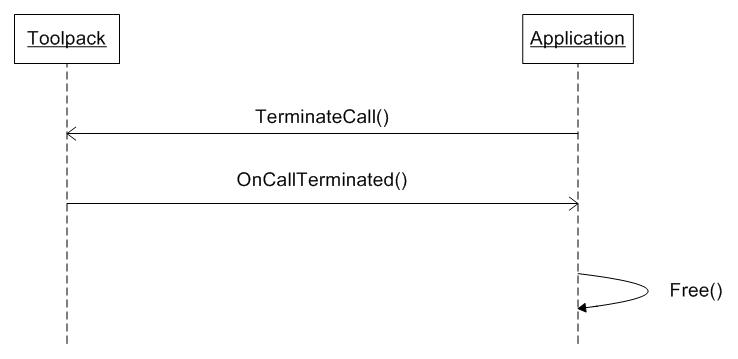
2. Free leg object on [**OnCallTerminated()**](https://docs.telcobridges.com/mediawiki/autodoc/class_c_t_b_c_m_c_leg.html#CTBCMCLeg::OnCallTerminated)
When **TerminateCall()** is called, the Toolpack framework will start leg termination. This includes media resources freeing, and for leg with signaling, sending of the appropriate signaling message to terminate the call. Once the media resources have been deallocated and call termination signaling is done, Toolpack will call **OnCallTerminated()** on the leg. When this event is received on the leg, this leg no more exists in Toolpack and the object can thus be freed. Any time after **OnCallTerminated()** (or within that function), the application is responsible to call method [**FreeLeg()**](https://docs.telcobridges.com/mediawiki/autodoc/class_c_t_b_c_m_c_leg.html#CTBCMCLeg::FreeLeg), which will eventually cause the leg's [ITBCMCFreeListener](https://docs.telcobridges.com/mediawiki/autodoc/class_i_t_b_c_m_c_free_listener.html) interface function **Free()** to be called. The ITBCMCFreeListener to use can be specified either in the CTBCMCLeg constructor and by calling [**SetFreeListener()**](https://docs.telcobridges.com/mediawiki/autodoc/class_c_t_b_c_m_c_leg.html#CTBCMCLeg::SetFreeListener) on the leg. The leg can be it's own *FreeListener*, in which it just 'delete' itself when its **Free()** method is called. An application specific *FreeListener* can be used for cases where other action needs to be taken before the leg is deleted. An example could be the case where the leg object was allocated from a pool and it should be returned to that pool instead of being deleted.
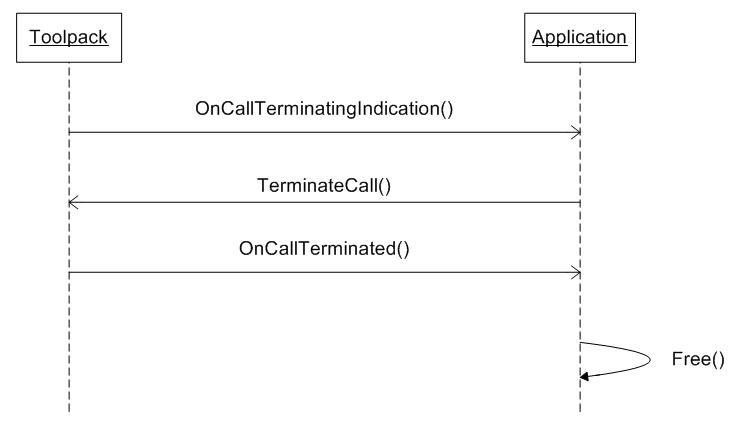
In some situations, it is possible that leg termination is initiated by Toolpack. This can happen for a leg with signaling, when a call termination request is received on the signaling channel. It can also happen on any type of leg in the event of sudden media resource unavailability and other media resource or signaling error. In these cases, the [**OnCallTerminatingIndication()**](https://docs.telcobridges.com/mediawiki/autodoc/class_c_t_b_c_m_c_leg.html#CTBCMCLeg::OnCallTerminatingIndication) is sent to the leg. On reception of this event, the application should initiate call termination as shown below.
In case of internal system error or major communication is lost with the Toolpack engine, Toolpack will send the [**OnLegTerminated()**](https://docs.telcobridges.com/mediawiki/autodoc/class_c_t_b_c_m_c_leg.html#CTBCMCLeg::OnLegTerminated) event. This event indicates that the leg does not exist anymore on the Toolpack side and the user should free its object without trying any other interaction with Toolpack through it.
### Internally dropped incoming call
In some cases, the Toolpack framework will drop an incoming call before it's known to the CMC application layer:
* A call dropped due to local CPU or RAM congestion
* A call dropped to configured call rate limiting
* A SS7 call dropped due to failed continuity test request
These cases are reported to the CMC application in the <[https://docs.telcobridges.com/mediawiki/autodoc/class\\\_c\\\_t\\\_b\\\_c\\\_m\\\_c\\\_lib\\\_user.html#CTBCMCLibUser::OnCallLegFailure\*\*OnCallLegFailure()\*\*>](https://docs.telcobridges.com/mediawiki/autodoc/class\\_c\\_t\\_b\\_c\\_m\\_c\\_lib\\_user.html#CTBCMCLibUser::OnCallLegFailure**OnCallLegFailure\(\)**>) callback.
### Leg Synchronization on Failover
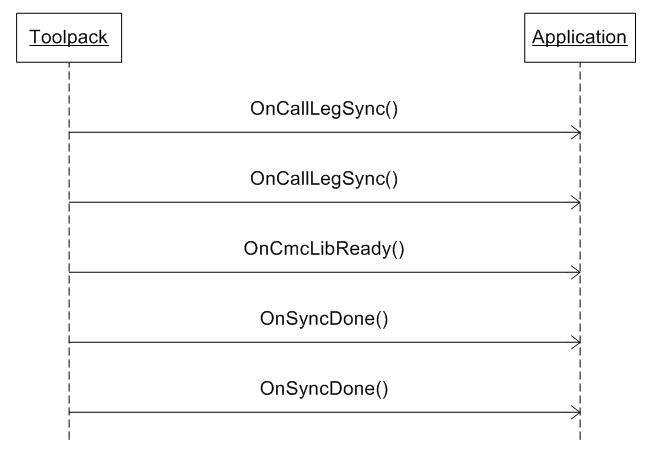
When a Toolpack application is restarted or when a standby application is activated, it goes through a synchronization phase with the Toolpack framework. During this phase, Toolpack informs the application of all the already allocated call legs through the **OnCallLegSync()** event of the [ITBCMCLibUser](https://docs.telcobridges.com/mediawiki/autodoc/class_i_t_b_c_m_c_lib_user.html) interface (this interface must be implemented by all user applications). One event will be received for each leg being synchronized. The course of action to take when receiving a leg synchronization event depends on the ability of the application to resynchronize its states with theses legs.
Once all **OnCallLegSync()** have been sent, Toolpack will start synchronization of the links between legs through **OnLinkSync()**. This event indicates that two legs are connected together. It can be used by the application to rebuild its internal states. As for the legs, unwanted links can be refused by calling the static function [**RefuseLink()**](https://docs.telcobridges.com/mediawiki/autodoc/class_c_t_b_c_m_c_leg.html#CTBCMCLeg::RefuseLink).
If the application can't resynchronize active legs or if it does not want to resynchronize the leg for which it is receiving an **OnCallLegSync()** event, it must: - Create call leg context for all synchronized legs, and keep them until links have been synchronized too (a leg linked to anther must be un-joined before it can be terminated) - Wait until all links have been re-synchronized (or refused using the static function \[ '''RefuseLink()''']). - Terminate all previously created call leg contexts that the application does not wish to keep, using the static function \[ '''RefuseLeg()'''].
When all links have been synchronized, Toolpack sends the **OnCmcLibReady()** event indicating that active resources synchronization is complete. At that moment, the application has all the information available on the Toolpack side to determine if the legs should be kept or release. Any leg that the application does not want to keep can be refused by calling **RefuseLeg()** on it. For all legs that have not been refused, an event [**OnSyncDone()**](https://docs.telcobridges.com/mediawiki/autodoc/class_c_t_b_c_m_c_leg.html#CTBCMCLeg::OnSyncDone) will be sent on the leg. Once this event has been received on a leg, the leg is fully functional and the application can start calling any usual Toolpack function on it.
#### Loss of Communication with Toolpack Engine
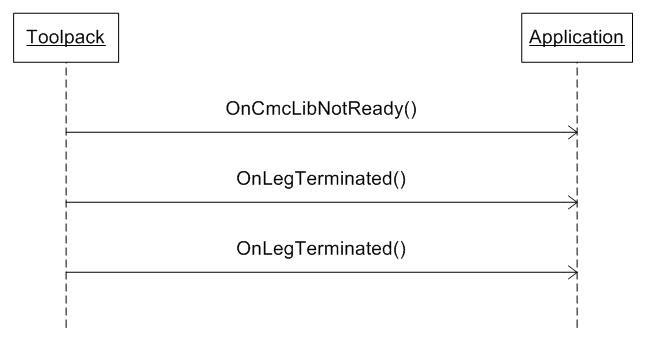
If communication is lost with the Toolpack Engine, event **OnCmcLibNotReady()** will be sent to the application. It indicates that the Toolpack framework is no longer accessible. The legs are still valid at that time but no action can be executed on them as long the CmcLib is not ready. If the connection with the Toolpack Engine is not back up, in less than 10 seconds, the CmcLib will declare a major communication loss and will call **OnLegTerminated()** on all the legs. In that case, when communication is regained with the Toolpack Engine, the synchronization sequence will start again from the beginning.
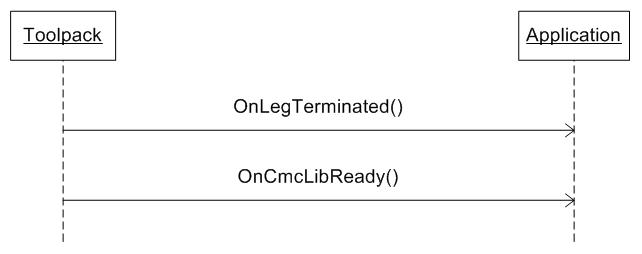
If the communication is regained before the 10 seconds timeout, event **OnCmcLibReady()** will be sent and the application can then continue working normally with its existing call legs. Note that you can also receive **OnLegTerminated()** on some legs before receiving the **OnCmcLibReady()** if those legs were in a transient state when disconnection occurred.
### Bridging the Media Path
#### Join
To bridge the media path between two legs, you must call [**Join()**](https://docs.telcobridges.com/mediawiki/autodoc/class_c_t_b_c_m_c_leg.html#CTBCMCLeg::Join) on one of the leg, giving the second leg as a parameter. This will connect the media path between the two legs according to the link properties set on the leg on which **Join()** is called. These link properties can be modified by overloading the [**GetJoinAttributes()**](https://docs.telcobridges.com/mediawiki/autodoc/class_c_t_b_c_m_c_leg.html#CTBCMCLeg::GetJoinAttributes). The important attribute to set is **IsFullDuplex()** that indicates if the connection will be made full-duplex (A<-->B) or half-duplex (A-->B). The default connection mode is full-duplex.
**Setting the link properties**
In your leg class adds a member variable to store the join attributes for that leg.
```
CTBCMC_JOIN_ATTRIBUTE mJoinAttribute;
```
Then set the join properties you want in your leg class constructor (or at any other location that will run **before** the **Join()** is done:
```
mJoinAttribute.IsFullDuplex() = TBX_TRUE;
```
Last, implement the **GetJoinAttributes()** function.
```
CTBCMC_JOIN_ATTRIBUTE & CH248Termination::GetJoinAttributes()
{
return mJoinAttribute;
}
```
**Broadcasting a media source**
Starting with Toolpack release 2.7, it's possible to broadcast ("fork") audio from one source leg to any number of destination legs, with the only restriction that one leg can be used as audio destination at most once. If a leg must be an audio destination for more than one source leg, a Mixer must be used, and the mixer output is sent to the destination leg.
#### Unjoin
To disconnect the media path between two legs, you must call <[https://docs.telcobridges.com/mediawiki/autodoc/class\\\_c\\\_t\\\_b\\\_c\\\_m\\\_c\\\_leg.html#CTBCMCLeg::Unjoin\*\*Unjoin()\*\*>](https://docs.telcobridges.com/mediawiki/autodoc/class\\_c\\_t\\_b\\_c\\_m\\_c\\_leg.html#CTBCMCLeg::Unjoin**Unjoin\(\)**>).
The *Unjoin()* function has an optional argument to specify which leg to unjoin from. If not provided (or NULL), the operation will be applied between the leg from which *Unjoin()* was called on, and its source leg (which is unique, as each leg can receive audio from only one source leg).
### Using timers
*CTBCMCTimer* class can be used to attach timers to call legs, and get an event upon timer expiry. Documentation can be found here: [Working with CTBCMCTimer](https://github.com/telcobridges-main/tmedia-wiki/tree/main/reference/api/caf-ctbcmctimer/README.md)
---
# Agent Instructions
This documentation is published with GitBook. GitBook is the documentation platform designed so that both humans and AI agents can read, navigate, and reason over technical content effectively. Learn more at gitbook.com.
## Querying This Documentation
If you need additional information that is not directly available in this page, you can query the documentation dynamically by asking a question.
Perform an HTTP GET request on the current page URL with the `ask` query parameter, and the optional `goal` query parameter:
```
GET https://prosbcdocs.telcobridges.com/telecom-references/transmission-and-lines/caf-working-with-cmc-call-legs.md?ask=&goal=
```
`ask` is the immediate question: it should be specific, self-contained, and written in natural language.
`goal` is optional and describes the broader end goal you are ultimately trying to accomplish on behalf of the user. GitBook uses it to tailor the answer towards what is most useful for that goal.
The response will contain a direct answer to the question and relevant excerpts and sources from the documentation.
Use this mechanism when the answer is not explicitly present in the current page, you need clarification or additional context, or you want to retrieve related documentation sections.