> For the complete documentation index, see [llms.txt](https://prosbcdocs.telcobridges.com/llms.txt). Markdown versions of documentation pages are available by appending `.md` to page URLs; this page is available as [Markdown](https://prosbcdocs.telcobridges.com/configuration-details/configuration-parameters-all.md).
# Configuration Parameters (all)
The following page contains links to definitions for each of the parameters used in configuring a Tmedia system through the Web Portal application.
Parameter: Add Angle Brackets Around SIP URI
Add angle brackets (characters: < and >) around all SIP URIs in the transmission.
Parameter: Add rPort
Use rport parameter to help SIP protocol NAT traversal.
Parameter: Adapter Type
The Adapter Type parameter is used to specify the type of hardware device being created, when adding a new adapter. Values for this parameter are selected from a drop-down list. The Adapter Type parameter can take on the following values:
* TMP
* TMS
Parameter: additonal naps
Custom columns will automatically create custom attributes in routing scripts that can be used to take routing decisions.
Parameter: Advanced Transport Servers configuration
Enable an advanced SIP Transport servers configuration. This allows for more than 16 transport servers by grouping them into SIP SAPs.
Parameter: Allow ICMP
Only applicable if the VLAN is on a LAN/WAN Ethernet port. If true, allow ICMP messages on this VLAN.
Parameter: Allow IP fragmentation
Allow fragmented IP packets. ICMP fragments are always unsupported.
Parameter: Allow Recurse
Allow redirection (3xx) recursion in version previous to 2.8.94.\
This should be unselected in newer version if SIP redirect is used.
Parameter: Always Send 100
Always send '100 Trying' response as soon as an INVITE is received.
Parameter: Append F to outgoing calls
Automatically append "f" to phone numbers on this NAP.
Parameter: Application Type
The type of application this configuration represents:
* User-specific: User-specific application (application not provided with the Toolpack package).
* TBOAM application: OAM application, responsible for system operation and maintenance.
* Toolpack Sys Manager: System manager application, responsible to apply system configuration.
* Toolpack Engine: Engine application, responsible to receive and to make calls (signaling and media).
* Stream server: Stream server application, responsible to play and record audio files during calls.
* Gateway: Gateway application, responsible for call routing and managing various call flow options.
* Toolpack Web server: Web Portal, responsible to provide the Web interface to configure the system and view its status.
* Fax server: Faxserver application, responsible to send and receive Faxes from tiff files.
* TbLogTrace: Log trace application, responsible to log traces to log files on the host's disk.
* TbDebug: Debug application, responsible to capture debug information from the system.
* TbUctWriter: UCT writer application, responsible to write UCT (unified call trace) logs to disk (similar to CDR, but more detailed for debugging call flows).
* TbSnmpAgent: SNMP agent application, responsible to respond to SNMP requests.
Parameter: Authentication
Authentication type to use.
Parameter: Bin Path
The path of this application's binary. Variable @{PKG\_BIN} points to 'bin' directory of active package.
Other available variables: @{PKG\_HOME}/@{CURRENT\_PKG}/bin/@{BUILDTYPE}/@{PLATFORM}/my\_application@{APP\_FILE\_EXTENSION}
Parameter: black white list
Custom columns will automatically create custom attributes in routing scripts that can be used to take routing decisions.
Parameter: Busy Tone Options: Busy Tone Maximum Duration (seconds)
Maximum time (in seconds) to play a busy tone. Call will be terminated after that delay.
Parameter: Busy Tone Options: Default Duration
Duration (in milliseconds) for DTMF tones played on calls using this profile.
Parameter: Busy Tone Options: Default Interval (between tones)
Delay between tones (in milliseconds) for DTMF tones played on calls using this profile.
Parameter: Busy Tone Generation: Generate Busy (Congestion) Tone
Generate a busy (warning or congestion) tone on incoming calls using this profile upon the failure of an outgoing call.
Parameter: Call Trace Trace Level
Call trace level to use when monitoring the system. The default is set at Level 1.
* Level 0 (loud) : All traces
* Level 1 : Call flow, IVR and SDP traces
* Level 2 : Call flow and IVR traces
* Level 3 : Call flow traces
* Level 4 (quiet) : No trace
Parameter: Call Trace Maximum Compressed Directory Size
Maximum size of all compressed uct file segments. Older uct segments are deleted if needed.
Parameter: Call Transfer Options: Call Transfer Mode
Indicates how to handle call transfer requests received on outgoing call legs using this profile.
Relay
* Relay call transfer requests from the outgoing call leg to the incoming call leg (Do not process locally)
Process
* Process call transfer (un-join outgoing call leg, route and join a new outgoing call leg)
Parameter: Call Transfer Options: Call Transfer Timeout
Timeout (in seconds) waiting for Transfer Target to answer, before joining back to Transferor.
Parameter: Call Transfer Options: Terminate Transferor Immediately
Terminate the Transferor call leg immediately (when initiating the new outgoing call towards the Transfer Target).
Parameter: Called
The Called parameter is used to set a filter to which each called number of an incoming call will be compared to see if the call matches the route. The called number can be a fixed number, but it can also be a regular expression (regex). Values for this parameter are entered into a field.
Parameter: called pre remap
Custom columns will automatically create custom attributes in routing scripts that can be used to take routing decisions.
Parameter: Calling
The Called parameter is used to set a filter to which each calling number of an incoming call will be compared to see if the call matches the route. The called number can be a fixed number but it can also be a regular expression (regex). Values for this parameter are entered into a field.
Parameter: Cache Expire Time
DNS name cache expiration time.
Parameter: Call Progress Method
Call progress transfer method.
Parameter: CDR format (end)
Format of the text CDR record written at the time the call is terminated. This format contains [CDR Text Variables](/configuration-details/configuration-by-web-portal-category/call-detail-records-cdr/cdr-variables.md#cdr-text-variables) that are automatically replaced.
### Example
```
@{Timestamp:%Y-%m-%d %H:%M:%S.@m%z},END,SessionId='@{SessionId}',LegId='@{LegId}',StartTime='@{StartTime}',ConnectedTime='@{ConnectedTime}',EndTime='@{EndTime}',FreedTime='@{Timestamp}',TerminationCause='@{TerminationCauseString}',TerminationSource='@{TerminationSource}',Calling='@{CallingNumber}',Called='@{CalledNumber}',NAP='@{NAP}',Direction='@{OrginatorName}'
```
Parameter: CDR format (start)
Format of the text CDR record written only at the time the call is answered. If the call is not answered, this record is not written. This format contains [CDR Text Variables](/configuration-details/configuration-by-web-portal-category/call-detail-records-cdr/cdr-variables.md#cdr-text-variables) that are automatically replaced.
### Example
```
@{Timestamp:%Y-%m-%d %H:%M:%S.@m%z},BEG,SessionId='@{SessionId}',LegId='@{LegId}',StartTime='@{StartTime}',ConnectedTime='
```
Parameter: CDR format (update)
Format of the text CDR log written periodically during call if the CDR option Enable periodic CDR update is used. This format contains [CDR Text Variables](/configuration-details/configuration-by-web-portal-category/call-detail-records-cdr/cdr-variables.md#cdr-text-variables) that are automatically replaced.
### Example
```
@{Timestamp:%Y-%m-%d %H:%M:%S.@m%z}:UPD,SessionId='@{SessionId}',LegId='@{LegId}'
```
Parameter: CDR Mode
Available choices:
* Text CDR only
* RADIUS CDR only
* Text and RADIUS CDR
* RADIUS CDR with text CDR fallback
Parameter: CDR System Id
Unique identifier of this system used as part of the the CDR 'Session Id' field (to make it unique across systems).
Parameter: Certificate Type
Type of certificate:
* Local: Certificate that is used to identify the server to the remote client.
* Intermediate: Certificate that is used to validate the remote client identity. This certificate is validated using a certificate chain up tp a parent trusted root certificate.
* Trusted: Certificate that is used to validate the remote client identity. It is the root (trusted) certificate of a certificates chain. It is issued by a trusted certificate authority (CA) and verifies that the client is who it declares to be.
Parameter: Clear Subscriptions on Call Complete
Clear the remaining subscriptions upon call completion.
Parameter: Community
Community name for for SNMPv1 or SNMPv2c access.
Parameter: Community name
Community name for SNMPv1 or SNMPv2c access.
Parameter: Commadn-line arguments
Command-line arguments to pass to the application when it is launched.
Parameter: Consulted Legs Recall
Period (in hour) to keep uct legs in Call Trace application memory when the call leg details have been consulted on the web.
Parameter: Content-Type
SIP header Content-type version value (typically itu-t, ansi or itu-t92+)
```
Content-Type:application/ISUP;base=itu-t92+;version=itu-t
```
Parameter: Default Invite Expires
Default value of the 'Expires' header for INVITE.
Parameter: Default Profile
The Default Profile parameter is used to set a profile for a NAP. The default value is simply labeled "Default" but can be changed if alternate profiles have been created. Values are selected from a drop-down list.
Parameter: Default Register Expires
Default value of the 'Expires' header for REGISTER.
Parameter: Default session timer value
Default session timer expiration value.
Parameter: Description
The Description parameter is an optional character string used to describe the purpose of a particular hardware adapter. Values for this parameter are entered into a field.
Parameter: Destination call leg remapped Profile
Profile to use for the outgoing call of this route.
Parameter: Destination IP address or domain
Destination IP address or domain to where the traps are sent.
Parameter: Destination Port
The Destination Port parameter is used to set a destination for a line in a system using SIGTRAN protocols. Values for this parameter are entered into a field.
Parameter: domain
Custom columns will automatically create custom attributes in routing scripts that can be used to take routing decisions.
Parameter: Domain name
Domain name to use
Parameter: Dns Enabled
Enable DNS name resolution support.
Parameter: Early Media Relay and Ring Tone Generation: Connect full-duplex during early-media
* Connect full-duplex during early-media: Forces full-duplex media on an outgoing call during early media (after call is alerted, before it's answered). This applies only to SIP calls (TDM calls are always connected full-duplex).
* When enabled: RTP and RTCP will be both received and sent toward outgoing call
* When disabled: RTP received from outgoing leg is bridged to the incoming leg, but no RTP or RTCP is sent toward the outgoing call
Parameter: Early Media Relay and Ring Tone Generation: Delay before connecting early media
* Delay before connecting early media: Insert a delay, upon reception of alerting indication, before joining audio from outgoing call to incoming call. This option is useful in situations where audio from the outgoing network contains glitch at the very beginning of the early media state
Parameter: Early Media Relay and Ring Tone Generation: Incoming Calls Early Media Mode
* Forward from outgoing to incoming call: Forward early media indication from outgoing call to corresponding incoming call, if present.
* Forward if present, otherwise play ring tone: Forward early media indication from outgoing call to corresponding incoming call, if present. Play ring tone to incoming call if corresponding outgoing call does not have early media.
* Always play ring tone: Always play a ring tone on the incoming call, no matter if there is early media indication on the corresponding outgoing call. This replaces the original ring tone sent from the remote.
* Never forward early media: Disable early media on incoming call no matter if there is early media on corresponding outgoing call.
Parameter: Early Media Relay and Ring Tone Generation: Ring Tone Starting State
Call state when the ring tone is started (if required) on the incoming call leg.
* Immediately: Ring tone starts immediately on an incoming call.
* Call Accepted: Ring tone starts on an incoming call once the outgoing call is accepted.
* Call Progress Received: Ring tone starts on an incoming call once 'Call Progress' is received on the outgoing call.
* Call Alerted: Ring tone starts on an incoming call once the outgoing call is alerted.
\
Notes:
* It is not common to start a ring tone before the call is alerted because it indicates that the remote phone is ringing, and that is only confirmed with an 'alerted' state.
* A ring tone that is started before the call is alerted may be replaced by early media from the outgoing call if later alerted with early media
Parameter: Early Media Relay and Ring Tone Generation: Outgoing Calls Early Media Mode
* Automatic early media detection:Rely on indications in outgoing call's signaling to determine if early media is present or not.
* Always assume early media is present: Consider early media always present on outgoing calls using this profile, no matter what's indicated by the signaling.
* Always ignore early media: Always ignore any early media present on outgoing calls using this profile, no matter what's indicated by the signaling.
Parameter: Echo Cancellation: Enable Coefficient Update
Activates the DC removal filter prior to the echo cancellation module. It should always be activated except during the testing of certain G.168 scenarios.
Parameter: Echo Cancellation: Enable DC Removal Filter
Activates the DC removal filter prior to the echo cancellation module. It should always be activated except for when testing certain G.168 scenarios.
Parameter: Echo Cancellation: Enabled
Allow echo cancellation. Will be used if other leg is TDM with option 'subject to hybrid echo' enabled.
Parameter: Echo Cancellation: Gain Power Level
Echo canceller digital gain level.
Parameter: Echo Cancellation: Non-Linear Processor Tune Option
Which NLP engagement to use:
* Normal: Default level of non-linear processing engagement of the echo cancellation module. This is the optimal setting for most call environments.
* Increased: Increased level of non-linear processing engagement of the echo cancellation module. This may be required for some 2 to 4 wire hybrids or line conditions with a large non-linear component in the echo.
* Reduced: Reduced level of non-linear processing engagement of the echo cancellation module. This can eliminate unpleasant voice artifacts such as choppiness if there are double-talk conditions while doing echo-tail characterization at the start of a call.
* Disabled: Disable the non-linear processing engagement of the echo cancellation module. It should always be active except for when testing certain G.168 scenarios.
Parameter: Email
This (optional) email address will receive important notifications such as:
* Availability of security fixes
* Availability of software fixes
* Reminder to renew the license before it expires
Parameter: Enable
Enable SIP-I mode for this NAP.
Parameter: Enabled
The Enabled parameter indicates whether or not an object is to be implemented or not. This value is set by checking the box labeled "Enabled".
Parameter: Enables
Enables DNS name resolution support for this group.
Parameter: Enable periodic CDR update
Enable periodic CDR update through call duration.
Parameter: Ethernet ports
The Ethernet port name.
Parameter: ETSI TS 102 027-2 2006 Compliant
Quirk to pass etsi ts102\_0272\_2006 compliance test. (This option conforms to a bug in the test case).
Parameter: Fax Modem Pass-Through Parameters: Codec
Select the outgoing invite codec (PCMU, PCMA) for fax/modem passthrough. On incoming calls, the system will use the codec received in the SDP.
Parameter: Fax Modem Pass-Through Parameters: Detection Type
NONE
* Fax passthrough will not be detected.
Silence suppression off
* The SDP parameter 'a=silenceSupp:off' will be used to detect fax passthrough.
G711 only
* The SDP parameter containing only one G711 codec will be used to detect fax passthrough.
Parameter: Fax Modem Pass-Through Parameters: Force V.152 VBD
Force V.152 auto-switch to Passthrough relay mode. This forces the auto-switch without the SDP negociation.
Parameter: Fax Modem Pass-Through Parameters: Jitter Buffer Depth
Depth of the received packets jitter buffer for fax passthrough
Parameter: Fax Modem Pass-Through Parameters: Packet Duration
Packet duration for FAX passthrough.
* 5 ms: Use packet duration of 5ms
* 10ms: Use packet duration of 10ms
* 20ms: Use packet duration of 20ms
* 30ms: Use packet duration of 30ms
* 40ms: Use packet duration of 40ms
* 50ms: Use packet duration of 50ms
* 60ms: Use packet duration of 60ms
* 70ms: Use packet duration of 70ms
* 80ms: Use packet duration of 80ms
* 90ms: Use packet duration of 90ms
* 160ms: Use packet duration of 160ms
Parameter: Fax Modem Pass-Through Parameters: Support V.152 VBD
Support V.152 auto-switch to Passthrough relay mode.\
This forces the SDP attribute gpmd to be negociated.\
This list of tones will be detected and switch to passthrough will be done when this parameter is enabled:
* Bell 103 Tone
* V.22 USB1 or Bell\_ANS
* Fax calling tone
* V.21 flags
* V.8bis CRe tone
* ANSam/
* ANS/
* ANSam
* ANS
* V.23 tones (1300, 390)
* V.21 tones (1650,980)
Parameter: Fax Modem Pass-Through Parameters: Use NSE
Enable using Named Signaling Event (NSE) when switching to Passthrough relay mode.
Parameter: Fax Modem Relay: Detection Mode
Standard
* Fax tones and T.38 re-invites will trigger fax relay mode. Modem tones and passthrough re-invites will trigger passthrough mode, though fax detection will still continue.
Use relay mode on any tone
* Both fax and modem tones will immediately cause a switch to the chosen relay mode (without going to passthrough first for modem tones).
Always relay
* Calls are directly invited using the specified relay mode, without waiting for any fax/modem tone. This improves performance when the calls are known to always be fax or modem (e.g. when connecting with a fax server).
Parameter: Fax Modem Relay: Enable early Fax/Modem tone detection
Enable early fax/modem detection. This makes a switch to T.38 or Passthrough happen faster when detected by longer tones (tones that can last a few seconds like ANSam).
Parameter: Fax Modem Relay: Enable Fax/Modem Relay
Enables Fax/Modem Relay
Parameter: Fax Modem Relay: Enable switching to FAX relay upon CNG tone
Switch to FAX relay mode upon detection of CNG (FAX) tone. If disabled, switching to FAX relay mode will occur later, upon detection of v.21 flags, or a re-invite from remote peer.
Parameter: Fax Modem Relay: Expected CNG tones
Minimum number of CNG tones to detect before switching to FAX mode. The CNG tones must be 2-4 seconds apart to be considered valid. Recommended value is 2, since switching upon first CNG may cause false positives
Parameter: Fax Modem Relay: Fax/Modem tones detection duration
Maximum time (in seconds) to listen to FAX tones (or 0 to never stop listening). After that delay, FAX tones are ignored. This avoids false FAX detection later in the call when a sound in an audio conversation is close to a FAX tone frequency.
Parameter: Fax Modem Relay: Modem vs. Fax distinction timeout
Delay before switching to Passthrough mode after detecting a tone that can be either a FAX or a Modem. The goal is to wait for FAX-specific tones (in which case switching to T.38 is better). This avoids double-switching (first passthrough, then shortly after T.38) in typical FAX scenarios.
Parameter: Fax Modem Relay: Relay Mode
T.38
* For FAX: Use T.38 but fallback to passthrough if T.38 is refused. For Modem: Use passthrough.
Passthrough
* Use passthrough to relay FAX or Modem.
Parameter: Fax Modem Relay: Switch to passthrough upon Bell ANS
Switch to modem relay mode (G711 passthrough) upon detection of Bell ANS tone (2225 Hz answer tone).
Parameter: Force FAX tones as telephony-event
Force the relay of FAX tones as telephony events, even if 'fmtp' is ommited or does not include fax events (32-36).
Parameter: Forwarding Mode
Select the Registration Forwarding Mode to the registrar:
```
* Contact Remapping: Changes the user and the IP address.
* Contact Passthrough: Doesn't change anything. Enables devices to be contacted directly without going through the SBC.
```
Parameter: FQDN
The Fully Qualified Domain Name (FQDN).
Parameter: Gateway
The Gateway parameter is used to associate the address of a TCP/IP network gateway with an IP port. This parameter is set by entering the address in the appropriate text box.
Parameter: Generate Space After Colon
Always insert a space after the colon in SIP headers.
Parameter: Graceful Upgrade Timeout
The Graceful Upgrade Timeout parameter is used to set a maximal delay for calls to terminate normally before an adapter is upgraded. Values for this parameter (in seconds) are entered into a field.
Parameter: G726 AAL2 format
G726 RTP payload formats matching the packetization of I.366.2
Parameter: Host VLAN
Host VLAN with which IP packets will be associated.
Parameter: Jitter Buffer: Initial Depth
Initial depth of the received packets jitter buffer.
Parameter: Insert Accept
Automatically insert 'Accept' header.
Parameter: Insert Allow
Automatically insert 'Allow' header.
Parameter: Insert Date
Automatically insert 'Date' header.
Parameter: Insert Expires
Automatically insert 'Expires' header.
Parameter: Insert Supported
Automatically insert 'Supported' header.
Parameter: Insert Timestamp
Automatically insert 'Timestamp' header.
Parameter: Interface name
Name of this IP interface.
Parameter: Is N+1 Backup
Indicates if this unit is a backup unit.
Warning This parameter can only be set when creating the unit for the first time. Afterwards it cannot be altered.
Parameter: IP Address
The IP Address parameter is used to set an address for accessing a new media gateway controller (MGC). An IP address is entered into the provided field.
Parameter: IP Interface
The IP Interface parameter identifies an IP interface that is to be associated with the structure being created. A preexisting IP interface is selected from a drop-down list.
Parameter: IP interfaces to allow
Interfaces on which the Web Portal will be reachable via the selected port. Select 'ANY' foe all IP interfaces.
Parameter: ISUP Protocol Variant
* ANSI88: Used for ANSI88 specification
* ANSI92: Used for ANSI92 specification
* ANSI95: Used for ANSI95 specification
* TELCORDIA: Used for BELLCORE specification
* ITU: Used for ITU, ITU88 and ITU92 specification
* ITU97: Used for ITU97 specification
* SINGAPORE: Used for SINGAPORE specification
* Q767: Used for Q767 specification
* NTT: Used for NTT specification
* CHINA: Used for CHINA specification
* ETSI: Used for ETSI specification
* ETSIV3: Used for ETSI V3 specification
* UK: Used for UK specification
* SPIROU: Used for Spirou specification
* RUSSIA: Used for Russia specification
\
The SIP header Content-type base value:
```
Content-Type:application/ISUP;base=itu-t92+;version=itu-t
```
is set according to the following table:

Parameter: Jitter Buffer: Maximum Depth
Maximum depth of the received packets jitter buffer.
Parameter: Jitter Buffer: Minimum Depth
Minimum depth of the received packets jitter buffer.
Parameter: Jitter Buffer: Smooth deletion
Allow the dropping of data from the jitter buffer in a way that is less audible than when whole packets are dropped.
Parameter: Local certificate
Local certificates (matching the private key) used to authenticate this system when connection to the remote party.
Parameter: Local DNS Port
The DNS port number for DNS queries.
Parameter: Local IP Interface
The IP interface that is used to send DNS queries.
Parameter: Local Port Type
Transport protocol for DNS queries.
Parameter: Location
The Location parameter is an optional character string used to identify the physical location of a hardware adapter. Values for this parameter are entered into a field.
Parameter: Managed by Web
Enables SSH configuration to be managed by the Web Portal. When this parameter is disabled, SSH configuration is managed by the operating system with a configuration file.
Parameter: Map any Response to Available Status
The Map any Response to Available Status parameter is set to consider the proxy available on any response class (including 5xx/6xx). When disabled, only 2xx/3xx/4xx responses to proxy polling mark the proxy as available; 5xx/6xx responses mark it as unavailable. Timeouts always mark the proxy as unavailable.
This parameter is set by checking the box labeled Map any response to available status, under the Advanced Parameters collapsible sub menu.
Parameter: Max Forward
Default value of the 'Max-Forwards' header.
Parameter: Maximum Call Legs
Maximum number of uct call legs hold in Call Trace application memory. The default value is set to 10000 legs. The maximum value that can be configured is 100000 legs.
Parameter: Maximum File Size
Maximum size of one uct file segment. Rotation to new segment is done if size exceeded.
Parameter: Min-SE value
Minimum session timer expiration value.
Parameter: MLPP: Default look ahead for busy when unspecified
Default look ahead for busy value. This value is used if the information is not present in the signaling.
* LFB allowed: Indicates that the LFB option is allowed.
* LFB path reserved: Indicates that the path for the call is reserved (national use).
* LFB not allowed: Indicates that the LFB option is not allowed.
Parameter: MLPP: Default precedence level when unspecified
Default precedence level value. This value is used if the information is not present in the signaling.
* PL flash override: Indicates that precedence level is flash override (highest).
* PL flash: Indicates that precedence level is flash.
* PL immediate: Indicates that precedence level is immediate.
* PL priority: Indicates that precedence level is priority.
* PL routine: Indicates that precedence level is routine (lowest).
Parameter: MLPP: Default network identity when unspecified
Default network identity value. Information sent to identify the network, which administers the supplementary service. The Telephone Country Code, and possibly the Recognized Private Operating Agency (RPOA) or Network ID. (0-999)
Parameter: MLPP: Outgoing Mode
* No MLPP insertion: No MLPP field is inserted in the outgoing leg. (Default)
* Relay MLPP information: MLPP fields are inserted in the outgoing leg only if they were received in the incoming leg. The missing received parameters will be completed by the default values of this profile.
* Always insert MLPP information: MLPP fields are inserted in the outgoing leg. MLPP fields from the incoming leg will be used if available. The missing received parameters will be completed by the default values of this profile.
* Forced MLPP Inofrmation: MLPP fields are inserted in the outgoing leg regardless of their values in the incoming. MLPP fields from the incoming leg will not be used.
Parameter: MLPP: Default service domain when unspecified
Default service domain value. Information sent in the forward direction to identify the specific MLPP service domain subscribed to by the calling user. (0-16777215)
Parameter: Name
The Name parameter must be entered in when creating a new object, during Web Portal configuration. The name of an object is a character string used by the Web Portal to identify that structure.
Parameter: Netmask
The Netmask parameter is used to set a subnetwork mask number on an IP port. This parameter is set by entering a four-decimal-point number (similar to an IP address) into the appropriate text box.
Parameter: NAP
The NAP parameter identifies a network access point (NAP) to be associated with a new object. A preexisting NAP is selected from a drop-down list.
Parameter: No Rx Packets
Terminate the call if no RTP packets were received for this duration. Use 0 to disable this feature.
Parameter: Organization
Default value to use in the 'Organization' header.
Parameter: Packet Duration
Packet duration for clear mode. (Also known as Clear Channel)
Parameter: Packet Network: Packet Loss Concealment
Perform packet loss concealment in order to reduce audio glitches that are caused by a packet loss.
Parameter: Packet Network: SSRC randomization
Enable the randomization of SSRC when the RTP stream is restarted (codec change or other similar reason).
Note that the RTP sequence number will still randomly change upon codec change even if SSRC randomization is disabled.
Parameter: Packet Network: Type of Service
Value to store in the TOS (Type of Service) field of the IP header of RTP packets.\
The most recent usage of this field is a six-bit Differentiated Services Code Point (DSCP) and a two-bit Explicit Congestion Notification (ECN).
0 1 2. 3 4 5 6 7
DSCP Field ECN Field
TOS Value DSCP Value
0 0
32 8
40 10
56 14
72 18
88 22
96 24
112 28
136 34
144 36
152 38
160 40
184 46
192 48
224 56
DSCP <=> IP Precedence Conversion Table
DSCP Name DS Field Value (Dec) IP Precedence (Description)
CS0 0 0: Best Effort
CS1, AF11-13 8,10,12,14 1: Priority
CS2, AF21-23 16,18,20,22 2: Immediate
CS3, AF31-33 24,26,28,30 3: Flash - mainly used for voice signaling
CS4, AF41-43 32,34,36,38 4: Flash Override
CS5,EF 40,46 5: Critical - mainly used for voice RTP
CS6 48 6: Internetwork Control
CS7 56 7: Network Control
Parameter: Password
The Password parameter is used to submit a user name for authentication. This parameter is set by entering a password into the appropriate text field.
Parameter: Periodic CDR update time
Delay in seconds between periodic update of CDR through call duration
Parameter: Password phrase
Authentication pass phrase (minimum length is 8 characters).
Parameter: Poll Remote Proxy
The Poll Remote Proxy parameter is set to enable proxy polling, in order to detect available proxies. This parameter is set by checking the box labeled "Poll remote proxy?".
Parameter: Polling delay to generate Traps
Delay for polling interface status to generate SNMP traps.
Parameter: Port
The port number that the transport server will be listening on.
Parameter: Port Type
The Port Type parameter is used to identify the type of IP port used by a SIP transport server. Values for this parameter are selected from a drop-down list. The Port Type parameter can take on the following values:
* UDP
* TCP
Parameter: prio
Custom columns will automatically create custom attributes in routing scripts that can be used to take routing decisions.
prio custom column name has been replaced with priority in version 3.0+ and is present on all new systems.
Parameter: Privacy phrase
Privacy pass phrase (minimum length is 8 characters).
Parameter: Privacy protocol
Privacy protocol to use.
Parameter: Privacy Type
* None: Don't relay privacy information.
* Remote-Party-Id: Send Remote-Party-ID header for relaying privacy information.
* P-Asserted-Identity: Send headers from RFC3325 (Privacy, P-Asserted-Identity) for relaying privacy information.
* Both: Send headers from RFC3325 (Privacy, P-Asserted-Identity) and Remote-Party-ID for relaying privacy information.
Parameter: Provisional Response Type
* Unsupported: Do not advertise support of provisonal ACK messages.
* Supported: Advertise support of provisional ACK messages.
* Required: Advertise support of provisional ACK messages and enforce their usage.
Parameter: Profile SDP Description
Identifies the SDP to use by VoIP calls that use this profile.
Parameter: Proxy Address
IP address, or domain name of the SIP Proxy represented by this SIP NAP
Parameter: Proxy Port
UDP/TCP port of the SIP Proxy represented by this SIP NAP
Parameter: Proxy Port Type
The Proxy Port Type parameter is used to identify the type of IP port used by Proxy. Values for this parameter are selected from a drop-down list. The Proxy Port Type parameter can take on the following values:
* UDP
* TCP
Parameter: Publish raw SIP to Routing Script
This parameter will copy the full incoming SIP INVITE information and send it to the routing scripts.\
This allows to extract information that may not be accessible otherwise.\
\
In normal operation without this option, the SIP information will be decoded and can be used directly in the routing scripts.\
See here for full details: [Routing scripts parameters](https://docs.telcobridges.com/wiki/Routing_Script_Parameter_Mapping_Table)\
\
This option may affect performance on some systems.
Parameter: Register to Proxy
The Register to Proxy parameter is set to indicate that a NAP should be registered to a proxy server. The parameter is set by checking the box labeled "Register to proxy?".
Parameter: Require client authentication
Request client (remote party) authentication.
Parameter: Reverse CDR call origin
If 'Reverse CDR call origin' is checked, CDR OriginatorName will show 'originate' for incoming call leg and 'answer' for outgoing call leg. If it is unchecked, CDR OriginatorName will show 'answer' for incoming call leg and 'originate' for outgoing call leg.
Parameter: RTP Port max
Last port included in this port range (legal values are 1024-65535, odd ports are skipped)
Parameter: RTP Port min
First port included in this port range (legal values are 1024-65535, odd ports are skipped)
Parameter: SBC Connection debug mode
Debug mode to acquire statistics without dropping packets. All interfaces will no longer be protected. Use with caution only when requested by support.
Parameter: SBC Default ban duration
Default time that a non matching entry will be put in the drop list.
Parameter: SBC Default entry duration
Default value of entry duration for manually created filters.
Parameter: SBC Default maximum bandwidth
Default value of maximum bandwidth (bytes) for manually created filters.
Parameter: SBC Default maximum bandwidth pps
Default value of maximum bandwidth (packets) for manually created filters.
Parameter: SBC Default temporary ban duration
Default value of temporary ban duration for manually created filters.
Parameter: SBC Maximum accept entries
Maximum number of accept entries. If this maximum is reached, no more connections may be established with trusted parties
Parameter: SBC Maximum drop entries
Maximum number of drop entries. If this maximum is reached and the CPU is in high-load condition, the DDOS protection mode will be activated.
Parameter: SBC Maximum filters
Maximum number of filters inside the Access Control List.
Parameter: SBC OAMP Default entry duration
Default value of entry duration for automatically created OAMP filters.
Parameter: SBC OAMP Default maximum bandwidth
Default value of maximum bandwidth (bytes) for automatically OAMP created filters.
Parameter: SBC OAMP Default maximum bandwidth pps
Default value of maximum bandwidth (packets) for automatically OAMP created filters.
Parameter: SBC OAMP Default temporary ban duration
Default value of temporary ban duration for automatically created OAMP filters.
Parameter: SBC SIP Default entry duration
Default value of entry duration for automatically created SIP filters.
Parameter: SBC SIP Default maximum bandwidth
Default value of maximum bandwidth (bytes) for automatically SIP created filters.
Parameter: SBC SIP Default maximum bandwidth pps
Default value of maximum bandwidth (packets) for automatically SIP created filters.
Parameter: SBC SIP Default temporary ban duration
Default value of temporary ban duration for automatically created SIP filters.
Parameter: SBC SIGTRAN Default entry duration
Default value of entry duration for automatically created SIGTRAN filters.
Parameter: SBC SIGTRAN Default maximum bandwidth
Default value of maximum bandwidth (bytes) for automatically SIGTRAN created filters.
Parameter: SBC SIGTRAN Default maximum bandwidth pps
Default value of maximum bandwidth (packets) for automatically SIGTRAN created filters.
Parameter: SBC SIGTRAN Default temporary ban duration
Default value of temporary ban duration for automatically created SIGTRAN filters.
Parameter: SBC H.248 Default entry duration
Default value of entry duration for automatically created H.248 filters.
Parameter: SBC H.248 Default maximum bandwidth
Default value of maximum bandwidth (bytes) for automatically H.248 created filters.
Parameter: SBC H.248 Default maximum bandwidth pps
Default value of maximum bandwidth (packets) for automatically H.248 created filters.
Parameter: SBC H.248 Default temporary ban duration
Default value of temporary ban duration for automatically created H.248 filters.
Parameter: Security Level
Specify the minimum level of encryption for SIP over TLS connections:
* Level 1: RSA 1024 bits or ECDSA 160 bits certificates minimum.
* Level 2: RSA 2048 bits or ECDSA 224 bits certificates minimum, no SHA1, no AES 128.
* Level 3: RSA 3072 bits or ECDSA 256 bits certificates minimum, ECDHE ciphers only.
* Level 4: RSA 7680 bits or ECDSA 384 bits certificates minimum.
* Level 5: RSA 15360 bits or ECDSA 512 bits certificates minimum.
Parameter: Security Level (SNMPv3)
Security level to use:
* None: No authentication and no privacy check
* Authentication: Authentication is mandatory and no privacy check
* Authentication and privacy: Authentication and privacy are mandatory
Parameter: Serial
The Serial parameter is used to define a product serial number, when creating a new hardware device. Entering characters into the Serial field will cause the number to auto-complete.
Parameter: SIP: Detect 180 with SDP as early media
A 180 with a SDP will be interpreted as early media
Parameter: SIP: Don't forward 183 progress
Do not forward 183 call progress in the call flow.
Parameter: SIP: Enable SIP Custom Headers
Allows you to read the SIP custom headers in the routing scripts. The custom headers are automatically forwarded to the outgoing call if it is a SIP call.
Parameter: SIP: Forward SS7 CPG hold/retrieval
Forward a call hold or retrieval indication (like SS7 CPG with generic notification indicator 'hold'/'retrieval') from this leg to the joined leg, or from the joined leg to this leg.
Parameter: SIP: Forward SS7 suspend/resume
Forward a suspend/resume indication from the other leg to a SIP re-invite with direction='inactive' or 'sendrecv'.
Parameter: SIP: Insert custom SIP BYE headers
Insert custom SIP BYE and BYE response (200 OK) headers.
Parameter: SIP: SDP combining options
Overlook transport directions
* The local/remote SDP combine will ignore sendonly or recvonly indications. Use sender's codec order.
* Sender's codec order will be used in the local/remote SDP combine result
```
Use the CTRL key to select or unselect multiple elements
```
Parameter: SIP: SDP generation options
No session level connection
* Session level connection line ('c=IN IP4 ...') will be omitted. Omit carriage return (OBSOLETE)
* Endlines in the generated SDP will not contain the carriage return characterGenerate all SDP parameters
* All parameters in the SDP will be generated, even when default value is used (makes SDP much longer, may cause problem over UDP). Use NSE instead of X-NSE in the NSE MIME
* Use NSE instead of X-NSE in the NSE MIME(Control-click to select/unselect multiple elements)
Parameter: SIP: Send 180 with SDP
Replace outgoing 183 and 180 without SDP message by 180 with SDP message in the call flow.
Parameter: SIP: Use isup-oli format
In some TDM networks, the [Originating Line Information (OLI)](/configuration-details/configuration-by-web-portal-category/routing-scripts/development-guides-and-tutorials.md) parameter defined in ANSI ISUP and 5ESS ISDN is used to carry information related to the calling party and the class of service for a call. Legacy multifrequency (MF) signalling networks carry this information in the ANI II Digits.
By default, the OLI is carried on SIP using the "oli" URI parameter:
```
From:“Jonh Doe”<>;tag=797D3031343235320021656B
```
With the option Use isup-oli format, the "isup-oli" URI parameter is used instead of "oli" URI parameter:
```
From:“Jonh Doe”<>;tag=797D3031343235320021656B
```
* When inter-working the OLI parameter from ISDN/ISUP to SIP, the OLI parameter is added to the From Header in the SIP INVITE message. If the NAP Advanced Parameters [Privacy Type](#parameter-privacy-type) is set, the OLI parameter is added to the *Remote-Party-Id* and/or or *P-Asserted-Identity*.
* When inter-working the OLI parameter from the SIP to ISDN/ISUP, the From SIP Header OLI parameter is added to the SETUP/IAM message on the TDM leg
Parameter: SIP: Use non ambiguous From tag
This will force a from as follows:
```
'From: ;tag=11222' instead of: 'From:
```
Parameter: SIP: Use reason header
Use SIP reason header if present has the drop reason cause for a call.
Parameter: SIP: Use SIP strict routing
Use SIP strict routing (according to RFC2543)
Parameter: SIP: User-to-User encoding
### Encoding options for SIP User-to-User header
#### Use hexadecimal encoding format
Each byte of the UUI is printed as a 2-digits hexadecimal value. This allows encoding any value in the UUI, including non-printable characters.
```
User-to-User:303030303030312e5468697320697320612074657374205555492076616c7565;encoding=hex;purpose=isdn-interwork;content=isdn-uui
```
#### Use text encoding format
UUI is stored "as-is" (without any modification) into the SIP header.
Note: If any illegal character is encounterd (non-printable, or illegal in a SIP header), the encoding will be forced to hexadecimal as shown above.
```
User-to-User:0000001.This is a test UUI value with only printable characters legal in a SIP header;encoding=text;purpose=isdn-interwork;content=isdn-uui
```
#### Use text encoding format with the escape illegal characters option
UUI is stored in the SIP header without modification (like with the text encoding format).
However, UUI bytes that do not corresponds to a printable ASCII character, or that corrsponds to an ASCII character that can't be used within a SIP header will be escaped.
Escaping is made by using character % followed by a 2-digits Hexadecimal value.
```
User-to-User:This is a test UUI value with non-printable data here %00%00%00%00%00%00%03.;encoding=text;purpose=isdn-interwork;content=isdn-uui
```
Parameter: SNMP System Contact
Contact of this system. Available from sysDescr.0
Parameter: SNMP IP port
SNMP Agent IP port
Parameter: SNMP System Description
Description of this system. Available from sysDescr.0
Parameter: SNMP System Location
Location of this system. Available from sysDescr.0
Parameter: SNMP System Name
Name of this system. Available from sysDescr.0
Parameter: SNMP System Object ID
The extension to base the value for sysObjectID.
Parameter: SNMP Version
SNMP version to use for the traps:
* SNMPv1: SNMPv1 (RFC1155 and RFC1157)
* SNMPv2c: SNMPv2c (RFC1901,RFC1907, RFC2578)
* SNMPv3: SNMPv3 (RFC3411 and RFC3412)
Parameter: Target State
The Target State parameter is used to set the live state of a hardware adapter. Values for this parameter are selected from a drop-down list. The Target State parameter can take on the following values:
* Disabled
* Probation
* Enabled
Parameter: TDM Lines Type
Type of physical connector present on the unit:
* UNKNOWN: Unknown physical line interface type
* OC3\_STM1: OC3 or STM1 physical line interface (optical connector)
* DS3: DS3 physical line interface
* E1\_T1\_J1: E1, T1 or J1 physical line interface (either with RJ48 or SCSI connectors)
* NONE: Unit without any TDM line interface
Parameter: TDM Volume Control: RX Gain Level
Audio level gain from TDM (to IP)
Parameter: TDM Volume Control: TX Gain Level
Audio level gain toward TDM (from IP)
Parameter: Translate privacy information
Enable the SIP privacy behavior (RFC 3323).
Parameter: trunk prefix
Custom columns will automatically create custom attributes in routing scripts that can be used to take routing decisions.
Parameter: Test Call Duration
The call duration (entered in seconds).
A value of 0 means that the call must be terminated manually.
Parameter: Test Called Number
* Generate Outgoing Call: The number that is used for the outgoing call.
* Simulate incoming call: Simulated incoming called number.
Parameter: Test Calling Number
* Generate Outgoing Call: The number that is called
* Simulate incoming call: Simulated incoming calling number
Parameter: Test Generate CDR
Create a CDR for this call.
NOTE: CDR behavior in the gateway must be enabled for this feature to work.
Parameter: Test FileTone to Play
* None: Does nothing
* Tone: Plays the tone string in the tone string field.
* File: Plays the selected file.
Parameter: Test Mode
* Outgoing: Generate an outgoing call that will not be subject to the routing table.
* Incoming: Simulates an incoming call that is directed through the routing table. This means that the call can be rejected or call parameters can be remapped accordinf to the routing table before the outgoing call is made.
Parameter: Test NAP
* Generate Ougoing Call: NAP used for the ougoing call
* Simulate Incoming Call: Simulated call on an incoming NAP.
Parameter: Test Record
Records the audio of the file. Result files are available in the call trace.
Parameter: Test Tone String
The tone string to play as defined in the H.248 definition.
Parameter: T1 Timer
The stack's T1 timer.
Parameter: T2 Timer
The stack's T2 timer.
Parameter: T4 Timer
The stack's T4 timer.
Parameter: Query Retry Count
The maximum number of times a DNS requery will occur before giving up.
Parameter: Query Timer
DNS query timeout.
Parameter: Refuse initial INVITE with To tag
Refuse initial INVITE if it contains a tag in the TO header.
Parameter: Remapped Called
Remapping rule for called number (outgoing call will be made using the modified called number)
Parameter: Remapped Calling
Remapping rule for calling number (outgoing call will be made using the modified calling number.)
Parameter: Remapped NAP
The Remapped NAP parameter is used to define which outgoing NAP will be selected when a particular route is used. Available NAPs are selected from a drop-down list.
Parameter: Remove method REGISTER
This option will remove the following fields from the Allow SIP header:
* REGISTER
* REFER
* SUBSCRIBE
* NOTIFY
This will prevent remote systems from sending these types of SIP headers
Parameter: Remove route header in outgoing invite
This option enables the SIP stack to remove the route header in the outgoing invite when loose routing is used.\
Loose routing is the default mode of operation for the SIP stack on Telcobridges devices.
From the Navigation pane of the web portal:
* Select Profile
* Select the specific profile
* Select SIP
* Select Advanced Parameters
* Leave Use SIP strict routing \[Unchecked]
[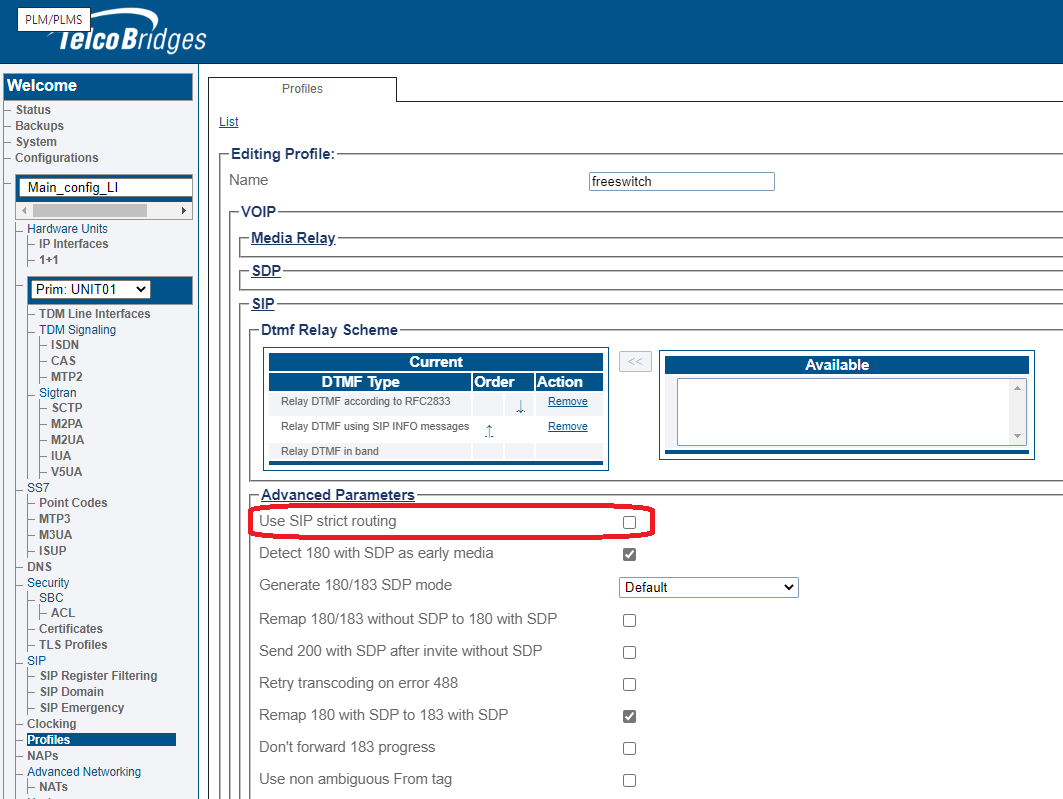](https://docs.telcobridges.com/wiki/File:SipStrictRoutingUnchecked.png)
Reference: trk#25590
Parameter: Routing Method
Select the Routing Method that the system will use to route calls to registered users (This must be enabled in routing scripts).
* Register source: Sends SIP Invite to the registering source IP address.
* Contact: Sends SIP Invite to the 'contact' from the Register message.
Parameter: Routeset Name
The name of the Routeset.
Parameter: routesets definition
Custom columns will automatically create custom attributes in routing scripts that can be used to take routing decisions.
Parameter: routesets digitmap
Custom columns will automatically create custom attributes in routing scripts that can be used to take routing decisions.
Parameter: RTCP: Enabled
Use RTCP on this RTP stream.
Parameter: RTCP: SDES-CNAME
SDES (Source DEScription) in RTCP packets.
Parameter: RTCP: Transmission Interval
The interval (in seconds) between RTCP transmissions.
Parameter: RTCP: Use XRTCP
Use extended RTCP.
Parameter: Server Address
DNS Server Address
Parameter: Server DNS Port
DNS server port.
Parameter: Service
Service for this entry.
* \_sip\_udp
* \_sip\_tcp
* \_sips\_tcp
Parameter: Services to use
Services that will be available on the IP Interface.
* RTP: Allows RTP Port Ranges
* SIP: Allows SIP transport servers
* SIGTRAN: Allows M2PA, M2UA, M3UA and IUA.
* OAMP/NAT: Allows web server, SSH, sFTP, SNMP and NAT. On a 1+1 system, will switch unit with the master OAM application
* H248/RADIUS: Allows H.248 and RADIUS. On a 1+1 system, will switch unit with the active gateway application
* TUNNEL: For internal use only
* FIXED MANAGEMENT: Management interface that will always be active on the same unit, even if system is down. On a 1+1 system, use Fixed Management Unit to select the unit.
Parameter: SIP Transport Server
A SIP Transport Server is used to transport the traffic from the SIP stack. It comprises a local IP Interface, and port to receive the [SIP](/appendices/appendix-a-glossary/glossary-sip.md) call. A SIP Transport Server can be of type UDP, TCP, or TLS and the default port for SIP is 5060. To learn how to create a transport server for the ProSBC, refer to [Create a SIP Transport Server](/configuration-details/configuration-by-web-portal-category/sip/creating-a-sip-transport-server.md).
Parameter: Source call leg remapped Profile
Profile to use for the incoming leg of this route.
Parameter: Subject
Default value to use in the 'Subject' header.
Parameter: Sub-System Number
The Sub-System Number parameter is used to assign a sub-system number to an object within the SS7 SCCP control layer.\
Integer values for this parameter are entered into a field.\
Allowable values are from 1 to 255.
0 Unknown SSN not known or not used.
1 SCCP management SCCP management
3 ISUP ISDN user part
4 OMAP Operation, Maintenance and Administration Part 5 MAP Mobile Application Part
6 HLR Home Location Register (MAP)
7 VLR Visitor Location Register (MAP)
8 MSC Mobile Switching Center (MAP)
9 EIR Equipment Identifier Register (MAP)
10 AUC Authentication Center
11 ISDN supplementary ISDN Supplementary services
13 BISDNE2EAPP Broadband ISDN Edge-to-Edge Application
14 TCTR TC Test Responder
142 RANAP Radio Access Network Application Part
143 RNSAP Radio Network Subsystem Application Part
145 GMLC Gateway Mobile Location Centre (MAP)
146 CAP CAMEL application part 1
47 gsmSCF Global System for Mobile Service Control Function (MAP)
148 SIWF Serving GPRS Support Node (MAP)
149 SGSN Serving GPRS Support Node (MAP)
150 GGSN Gateway GPRS Support Node (MAP)
249 PCAP Positioning Calculation Application Part
250 BSC BSSAP BSC Base Station System Application Part (BSSAP-LE)
251 MSC BSSAP MSC Base Station System Application Part (BSSAP-LE)
252 SMLC BSSAP Serving Mobile Location Center (BSSAP-LE)
253 BSSOM Base Station System Operation & Maintenance (A-interface)
254 BSSAP Base Station System Application Part (A-interface)"
Parameter: Support
Support the pound (number sign) and backslash characters in the user information part of SIP URIs.
Parameter: Support method UPDATE
Add the UPDATE method in SIP header Allow. SIP UPDATE is currently only used for Session Timer Refresh.
Parameter: Support Session Recording
The support header will contain siprec. Without this flag enabled, a '420 Bad Extension' is returned.
Parameter: Support Spiral Calls
Enable SIP spiral support. Spiral calls are SIP requests sent to a proxy that are routed back with a different Request URI. Both calls have the same Call-ID.
Parameter: Support Latin Characters
Support Latin characters (extended ASCII codes (128 to 255)) in the user information portion of SIP URIs.
Parameter: Support Quotes in Quoted String
Support extra quotes in display name quoted string.
Parameter: Telephony Services: Incoming Mode
Determines the conditions triggering a CNAM query on an incoming call:
* Never: No out of call method will be used to retrieve CNAM information.
* Automatic: Do a CNAM TCAP query to obtain the caller's name from a SCP (CNAM server) only if the name value of the caller is not present.
* Always: Always do a CNAM TCAP query to obtain the caller's name from a SCP (CNAM server) and overwrite the name value of the caller.
Parameter: T.38 Parameters: Fill Bit Removal
Removal of inserted fill bits in Phase C, non-ECM data.
Parameter: T.38 Parameters: Maximum Bit Rate
Set the maximum bit rate of the fax transmission, as follows:
* 33600 bps when V.34 is enabled
* 14400bps when V.34 is disabled
Parameter: T.38 Parameters: Prevent direct invite in T.38
Prevent T.38 to be used in the initial invite, instead inviting with voice codecs and subsequently re-inviting with T.38
Parameter: T.38 Parameters: Redundancy Count
Number of previously sent T.38 packets in each T.38 packet.
Parameter: T.38 Parameters: Transmission level (-1dBm unit)
Fax audio level toward TDM.
Parameter: T.38 Parameters: Use V.34
Enable the use of V.34 fax mode. v.17 can still be used during a call when V.34 is enabled.
Parameter: Unit
The Unit parameter defines the TMedia hardware adapter for which a new object is being created. An available hardware adapter is selected from a drop-down list.
Parameter: Untagged
Unselect 'Untagged' when the virtual port uses VLAN. Select 'Untagged' when the virtual port uses untagged.
Parameter: Use alternate anonymous address
The "from" URI will be altered to \[gateway IP] instead of .
Parameter: Use Cache
Use DNS name caching for improved performance.
Parameter: Use Compact Hdr
Use compact header format.
Parameter: Use DHCP
The Use DHCP parameter is used to indicate that the DHCP autoconfiguration protocol is to be used on an IP port. This parameter is set by checking the box labeled Use DHCP.
Parameter: Use Enum
Enables ENUM name resolution support.
Parameter: Use Fqdn Contact
Use fully qualified domain name in 'Contact' header instead of the IP address.
Parameter: Use session timer
Use SIP session timers. This is used to make sure the remote SIP device is still up. If the remote SIP device does not answer, the call will be dropped.
Parameter: Use script
Routing script to use for routing incoming calls to outgoing calls. Use NONE for basic routing using static routes.
Parameter: Use system names
Enable the use of system names to identify adapter interfaces.
Parameter: User-Agent
This is the User-Agent and Server header fields in the SIP messages.\
Customer can customize this value with a text field of up to 30 characters. If left blank a default string will be inserted, which is the serial number of the unit.
Parameter: User Group
The user group to which the user is assigned.
Parameter: User Name
The name of the user.
Parameter: Username
User name for SNMP v3 access.
Parameter: Using Symmetric Response Routing
This parameter reverts the support of [RFC 3581](https://www.rfc-editor.org/rfc/rfc3581). We found that this does not work in all environments.
Reference: trk#25671
Parameter: Virtual port
Virtual port from which IP packets will exit.
Parameter: VLAN id
VLAN Identifier (VID)
Parameter: Voice Activity Detection: Enabled
Enable VAD while recording, so that silence is truncated at the beginning of recorded files.
Parameter: Voice Activity Detection: Noise floor level
The noise floor for codecs using voice activity (silence) detection, or comfort noise generation.
Parameter: Write operation allowed
Provide the user with write access, otherwise the user has read-only access.
Parameter: Working Path
Path of the working directory of this application.
LNP Options: Incoming Calls LNP Mode
Terminate LNP
* Routing is done using the real called party number (not the LRN). LNP fields are ignored for the outgoing leg. (Default)
Forward LNP from incoming to outgoing call
* Routing is done using the LRN when available otherwise the called party number is used. LNP fields are kept for possible relay on outgoing leg.
Ignore LNP information
* Routing is done using the called party number. LNP fields are ignored for the outgoing leg.
\
The following table contains the pseudo-code of the mapping according to the configuration AND the content of the incoming call signaling:\
CPN = called party number or the TO sip header\
called = called number variable accessible in routing script\
GAP = generic address number SS7 information element type 0xc0\
ported\_number = extra number type accessible in the routing script\
RN = rn field in SIP request URI\
bitM = SS7 Forward call indicator information element: ported number translation indicator (bit M)\
X = drop number
LNP Options: Outgoing Calls LNP Mode
No LNP insertion
* No LNP field is inserted in the outgoing leg. (Default).
Relay LNP information
* LNP fields are inserted in the outgoing leg only when they are received in the incoming leg.
Always insert LNP information
* LNP fields are inserted in the outgoing leg regardless of their presence in the incoming leg.
\
The following table contains the pseudo-code of the mapping to the outgoing call according to the configuration AND what was present in the routing script variables:\
CPN = called party number or the TO sip header\
called = called number variable accessible in routing script\
GAP = generic address number SS7 information element type 0xc0\
ported\_number = extra number type accessible in the routing script\
RN = rn field in SIP request URI\
bitM = SS7 Forward call indicator information element: ported number translation indicator (bit M)\
X = drop number
SIP : Max Forwards header handling
Determine how to pass the hop counter (or SIP max-forwards) from the incoming leg to this outgoing SIP leg (as max-forwards header on this SIP outgoing leg)
* Don't forward: Don't forward the incoming leg's hop counter (max forwards) to this outgoing leg
* Forward: Forward the incoming leg's hop counter (max forwards) to the outgoing this (without decrementing)
* Decrement and forward: Decrement and forward the incoming leg\\'s hop counter (max fowards) to this outgoing leg. Drop the call if value reached 1.
SIP : Forward SIP Hold type
SS7 message to forward on the joined leg when a SIP call on this NAP receives a SIP re-invite indicating call hold/resume (direction 'inactive' or 'sendrecv', or connection address '0.0.0.0')
* Don't forward: Don't forward to the SS7 network
* SS7 Suspend/Resume: Suspend/Resume ISUP messages on the SS7 network
* SS7 Remote Hold/Retrieval: Call progress (CPG) with generic notification indicator indicating remote hold/retrieval (Q.763 section 3.25)
### Configuration
* [Modifying SIP Profile Settings](/configuration-details/configuration-by-use-case/rtp-no-anchoring/creating-profiles/modifying-sip-profile-settings.md)
* [Modifying Profile for SPIROU](https://docs.telcobridges.com/wiki/Toolpack:Modifying_Profile_for_SPIROU_A)
---
# Agent Instructions
This documentation is published with GitBook. GitBook is the documentation platform designed so that both humans and AI agents can read, navigate, and reason over technical content effectively. Learn more at gitbook.com.
## Querying This Documentation
If you need additional information that is not directly available in this page, you can query the documentation dynamically by asking a question.
Perform an HTTP GET request on the current page URL with the `ask` query parameter, and the optional `goal` query parameter:
```
GET https://prosbcdocs.telcobridges.com/configuration-details/configuration-parameters-all.md?ask=&goal=
```
`ask` is the immediate question: it should be specific, self-contained, and written in natural language.
`goal` is optional and describes the broader end goal you are ultimately trying to accomplish on behalf of the user. GitBook uses it to tailor the answer towards what is most useful for that goal.
The response will contain a direct answer to the question and relevant excerpts and sources from the documentation.
Use this mechanism when the answer is not explicitly present in the current page, you need clarification or additional context, or you want to retrieve related documentation sections.